1
Open the ad’s public comments
In Ads Manager, open the ad and use the path that shows comments on the published post (labeled differently in some account versions). Dark posts often need the Ads Manager route rather than the Page feed.

Keyword lists, blanket hide-all, and classify-then-hide: how to automate Facebook ad comment hiding without burying buyers.
8 min read · Published Aug 9, 2026
The problem
Facebook ad comments arrive while you are still paying for the impression. Spam links, scam bait, competitor redirects, and abuse show up next to real sizing and shipping questions. Manual hiding works until volume does not.
So teams look for Auto-hide. The trap is treating Auto-hide as a single switch. Hiding everything that looks “bad” also hides fair complaints and sharp buyer questions. Leaving everything public until a human wakes up leaves junk under the creative overnight.
The real job is selective speed: remove clear junk before the next buyer sees it, keep conversion comments visible, and make every hide reversible. The methods below trade those goals in different ways.
Method 1
The baseline: open the ad thread in Ads Manager or Meta Business Suite and hide comments one by one. Accurate when you have time. Too slow when campaigns spike.
In Ads Manager, open the ad and use the path that shows comments on the published post (labeled differently in some account versions). Dark posts often need the Ads Manager route rather than the Page feed.
Hide removes the comment from public view while the commenter can still see it. That usually stops the same person from immediately reposting. Delete is harder to reverse and is the wrong default for most ad threads.
When Meta gives you the option, ban accounts that keep posting scam or competitor bait. One hide without a ban invites a second comment five minutes later.
While you are already in the thread, reply to shipping, sizing, and stock questions. Auto-hide later should not become an excuse to ignore the conversion half of the job.
Manual hiding is the right answer at a few junk comments a day. It fails at scale in predictable ways: overnight spam, weekend launches, and Advantage+ creatives that scatter comments across variants.
Method 2
The first automation most teams try: Page-level keyword blocklists and Instagram Hidden Words. Exact matches hide. Everything else stays public.
Competitor names you already see, scam phrases, “DM for catalog”, and the link patterns that show up on your ads. Long lists of common English words create false positives.
Page keyword and profanity filters can reach ad comments in many setups. Meta’s Moderation Assist does not cover ads the same way. Details live on the Facebook ads comment filter guide.
Buyers who wrote “is this a scam?” as a genuine trust question sometimes trip the same words as bait. Unhide the mistakes and tighten the list.
Keyword Auto-hide is fast and deaf. It catches exact phrases and misses coded competitor bait, emoji spam, and new scam formats. It is a floor, not a full moderation system.
Method 3
The aggressive option some tools offer: hide all new comments, or auto-hide anything the model scores as negative. The thread looks spotless. The social proof disappears with it.
Hide-all removes praise, buying questions, and junk together. Sentiment hide-all often treats “this broke after a week” the same as abuse.
Prospects read the first visible comments. An empty or suspiciously quiet thread can feel as risky as a spammy one, especially on higher-ticket ads.
Reserve blanket rules for a short crisis window or a single toxic creative, then switch back to selective Auto-hide. Permanent hide-all is usually a workaround for silence, not moderation.
Blanket Auto-hide solves volume by deleting the signal. Most brands that try it for a week keep the spam filters and put the buyer questions back on display.
Method 4
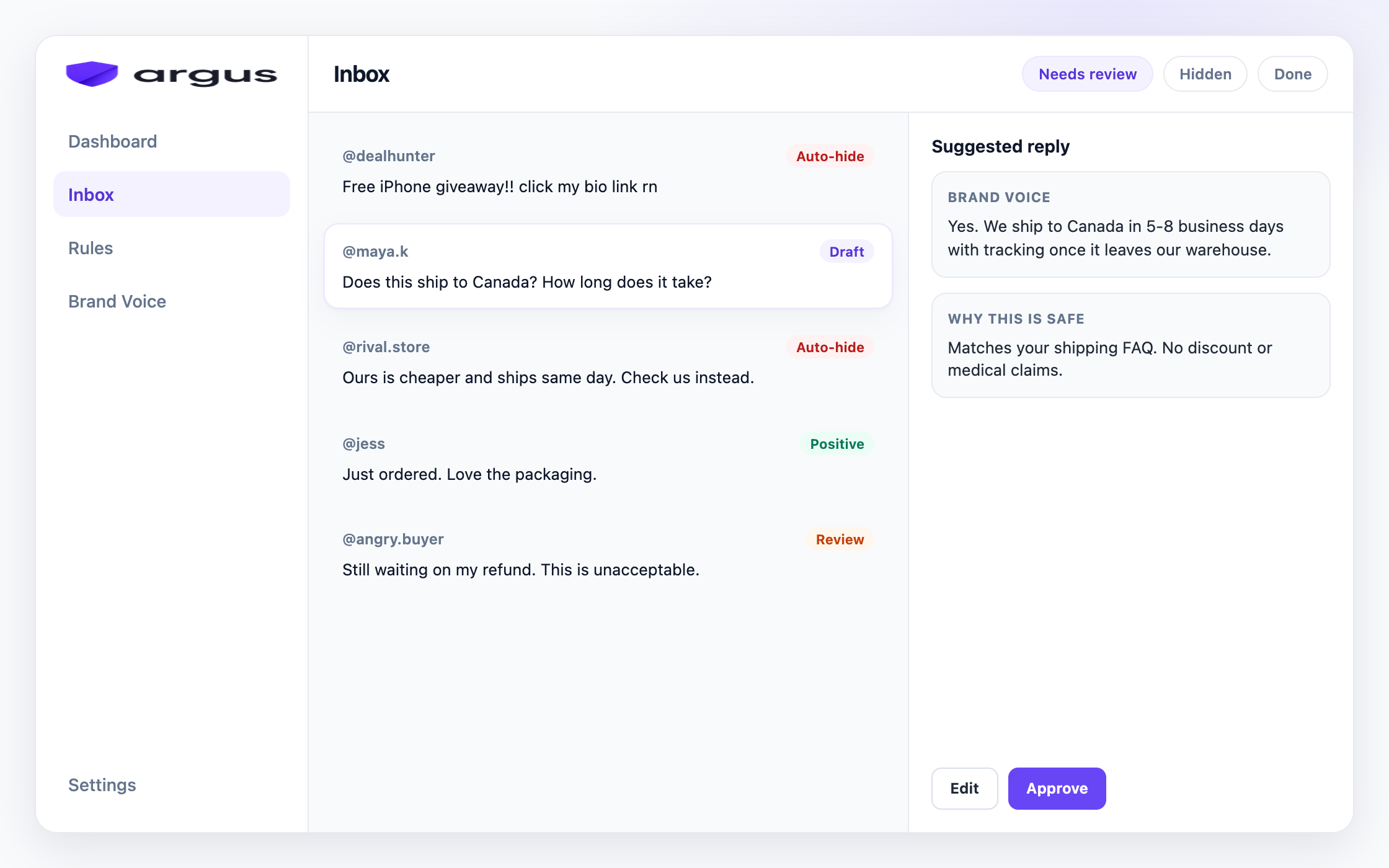
The durable model: classify each comment first, then Auto-hide only the categories you trust. Spam, scam, and clear abuse can hide automatically. Buyer questions and gray cases stay visible for a person.
Spam, scam, toxic content, competitor bait, buyer questions, complaints, and sensitive topics need different actions. One sentiment score cannot carry that map.
Start with high-confidence spam and scam. Add toxic content and competitor bait once the false-positive rate looks acceptable. Leave complaints and sensitive topics on Human review.
Prefer hide from public view over delete. A weekly unhide pass for false positives is part of the system, not an admission of failure.
Automation that only hides still leaves money on the table. Draft or reply to the buying questions that remain public.
Classify-then-hide is slower to configure than a keyword list and safer than hide-all. It is the first method where speed and a believable thread overlap.
Hiding junk reduces the pile a person must handle. Estimate the remaining weekly load with the free Meta ad comment coverage calculator.
Starter map
Peer tools expose long menus of message types, conditions, actions, schedules, and assignments. The useful takeaway is not to turn every control on. Start with a small map that tells each comment where it belongs before anything hides automatically.
Comments with obvious off-site links: Auto-hide when the link is promotional, suspicious, or unrelated to the product. Send unclear customer links, press mentions, and screenshots to Human review instead of hiding every URL by reflex.
Clear spam, scams, and impersonation: Auto-hide on first pass, then ban or report repeat accounts when Meta gives you that option. These are the comments where speed matters more than public discussion.
Competitor mentions and discount-code bait: Use Draft for review or Human review until your competitor list and false-positive review are stable. Then Auto-hide only direct poaching, not every fair comparison.
Buyer questions and product concerns: Keep them visible and route to Draft for review. An auto-hide rule that catches “price”, “shipping”, or “legit” without reading intent will bury buyers.
All comments during a crisis window: Use only as a short-term cage for a single toxic creative or launch spike, then turn it off. Permanent hide-all removes praise and social proof along with junk.
Schedule and review: If a rule runs overnight or on weekends, schedule a hidden-comment review for the next business day. The review is part of the rule, not cleanup after the fact.
For keyword-only setup, pair this with the Facebook ads comment filter guide. For hands-on spam triage, use the hide spam comments guide.
Reality check
Four methods, and the same frustrations keep showing up when teams turn Auto-hide on for the first time.
“It hid a real buyer who asked if we were legit.” Keyword lists and sentiment tools both trip on trust questions. Classify intent, not just the word “scam”, and review the hidden pile.
“Spam still got through with weird spelling.” Exact-match lists miss deliberate misspellings and new formats. Classification catches more of those patterns than a static blocklist alone.
“We hid everything and the ad felt dead.” Blanket hide-all removes the social proof. Selective Auto-hide keeps praise and buying questions visible on purpose.
“I thought Moderation Assist was already Auto-hiding ads.” Assist does not cover ads the same way Page keyword and profanity filters can. Many teams discover that gap after a messy launch week.
Decision guide
Start narrow: Auto-hide high-confidence spam and scam first. Expand only after you have reviewed a week of hidden comments.
Never Auto-hide every complaint by default: Fair product issues belong in Human review or a respond-first path. Hiding them quietly trains buyers to assume you scrub bad news.
Prefer hide over delete: Hides stay reversible. Deletes make mistakes expensive.
Review false positives on a schedule: A Friday unhide pass beats a month of buried buying questions.
Keep a reply path for what stays public: Auto-hide without answers leaves the conversion half of the thread unfinished.
How Argus fits
Everything above points at the same conclusion: Auto-hide works when understanding comes before the hide. That is the order Argus is built on.
Argus classifies every comment under your Facebook and Instagram ads first, then applies your Protection board. Categories you set to Auto-hide (typically clear spam, scam, and similar junk) hide from public view when confidence clears your threshold. Gray cases can stay on Human review instead of disappearing by accident.
Protection labels are exact: Auto-hide, Draft for review, Reply & send, Human review, or Do nothing. Draft for review stays the default for replies. Safe Autopilot is a separate opt-in for narrow FAQ auto-sends, not a synonym for Auto-hide.
Argus covers public comments on Facebook and Instagram ads and posts. It hides rather than deletes, it does not automate DMs, and it does not claim to replace Meta’s own Page filters. Use native keyword lists as a floor, then let classification catch what the list misses.
FAQ
Partially. Page keyword blocklists and profanity filters can hide matching comments on many ad setups. Moderation Assist does not cover ads the same way. For intent-based Auto-hide beyond exact words, teams use a moderation tool.
Yes, a link-focused rule can help with spam, phishing, and competitor redirects, but it should not hide every URL forever. Keep legitimate customer context in review and audit false positives.
No. Abuse and bait can Auto-hide. Fair complaints and trust questions usually need a human. Blanket negativity hiding removes social proof and buries real buyers.
Yes for most cases. Hide removes the comment from public view and stays reversible. Delete is harder to undo and is the wrong default for routine junk.
Start with high-confidence spam and scam on Auto-hide. Keep complaints and sensitive topics on Human review until you trust the routing.
The hide-spam guide walks through native hide steps and spam triage. This page owns Auto-hide as a mode: keyword vs blanket vs classify-then-hide, and how to configure it without burying buyers.
Classify first, Auto-hide only what you trust, and keep replies for the comments that stay public.