1
Open the ad's comments
In Meta Ads Manager, open the ad and choose to view its comments. For a broader queue, use the paid-comments view for the Page in Meta Business Suite.

How to spot Facebook comment bots, hide clear spam, use native Page controls, and keep real buyer questions visible.
9 min read · Published Aug 4, 2026
The problem
Spam under Facebook ads is not one thing. It is copy-paste promo chains (“DM us for the real discount”), emoji farms, crypto and investment bait, fake giveaways with lookalike shop links, and accounts impersonating your support team. It shows up under your ads because your ads give it reach: the spammer is renting your impressions.
Speed matters more here than on organic posts. The comment sits next to the creative while you are paying for every impression. Spam that lands at midnight lives next to your offer until someone opens Ads Manager in the morning, and every new viewer reads it before they decide anything about your product.
So the job is two-sided: hide the junk fast, and do not hide the buyers. A sizing question and a scam link can look identical to a tired reviewer at 1 a.m. Every method below is a trade-off between those two goals, and the right answer changes with your volume.
Pattern check
A sparse profile, odd grammar, or blunt complaint is not proof of automation. Look for repeated behavior across ads, accounts, destinations, and time.
The same pitch appears under unrelated ads: a promotion, investment offer, discount code, or agency line repeats word for word beneath different products. The cross-ad repetition is stronger evidence than a new profile or awkward sentence by itself.
A lookalike support account replies to your buyers: the name and image resemble your Page, but the account asks for a payment, verification code, private message, or click. Hide the reply, report the impersonation, and post a short warning from the real Page when shoppers may have seen it.
The comment exists only to move people elsewhere: generic praise leads into a profile, unrelated Page, messaging app, or suspicious domain. Check the destination and the surrounding thread before treating an ordinary link or customer mention as spam.
Rotating accounts arrive in a burst: several thin profiles post similar replies beneath a top comment or across active ads within minutes. Hide the clear spam and ban repeat Page accounts, but leave one-off criticism and real questions in review.
Use the Page action that fits the evidence: hide clear spam, report fraud or impersonation, ban accounts that keep returning, and review anything that could be criticism or buying intent.
Method 1
This is the baseline everyone starts with, and at low volume it is genuinely enough. You read the thread and act on each comment yourself.
In Meta Ads Manager, open the ad and choose to view its comments. For a broader queue, use the paid-comments view for the Page in Meta Business Suite.
Hover the comment, open the menu, and choose Hide. The comment leaves public view but stays visible to the commenter and their friends, so it rarely escalates.
Delete only for clear policy violations: hate speech, explicit content, obvious illegal links. Everything else is safer hidden, because hide is reversible.
When the same account keeps returning, ban it from the Page from the same comment menu. Hiding treats comments; banning treats accounts.
Manual hiding is honest work, and for a few comments a day it is the right amount of tooling. It breaks when spend scales: overnight gaps, weekend backlogs, and three teammates applying three different standards to the same thread.
Visibility explained
When you hide a comment on Facebook, it disappears from public view but remains visible to the person who wrote it and that person's Facebook friends. The author is not notified that you hid it. Ad comments follow the same basic visibility behavior as comments on a Page post.
That is why hiding is usually safer than deleting. The scam, spam, or bait stops shaping the public thread, while the commenter is less likely to notice the moderation and repost angrily. Replies nested under the hidden comment leave public view with it.
Hiding is reversible. You can review hidden comments and unhide a false positive later. It does not stop the same account from commenting again, so persistent offenders may also need to be banned from the Page. Delete should stay reserved for clear policy violations because it removes the recovery option.
Method 2
A Page keyword filter can hide ad comments that contain the words, phrases, or emojis you specify. Meta documents support for up to 1,000 entries plus common variations, which makes this the useful native baseline for recurring spam. Moderation Assist is not a substitute here because its rules cover organic Page comments, not ad comments.
Switch into the Page, open Settings, then find the comment-word controls under Followers and public content. Meta changes labels occasionally, so look for the option to hide comments containing certain words.
Start with the phrases, domains, and emoji sequences that actually recur under your ads. Specific entries catch repeat campaigns without swallowing ordinary buyer language.
Do not block words like free, link, win, price, or DM on their own. They appear in both spam and real questions, so broad rules create preventable false positives.
Open the Page's hidden comments, unhide mistakes, and update the list from the spam patterns that got through. A filter you never audit quietly drifts away from the thread.
Keyword filtering matches strings, not meaning. It cannot tell that “is the free shipping back?” is a buyer while “FREE IPHONE NOW” is bait unless the entries are specific enough. Agencies also repeat and maintain the setup Page by Page.
Method 3
The profanity filter is the second Page-level control that covers ad comments. It catches common offensive language without requiring you to build every entry yourself. It is simple and blunt, so it belongs underneath a review process, not in place of one.
In the same Page settings area, turn on the profanity filter at the level your brand can defend. A stricter setting catches more abuse but raises the false-positive risk.
Profanity filtering is useful for obvious toxic language. It will not catch polite scam offers, fake support accounts, lookalike links, or emoji-only promo chains.
Review hidden comments for reclaimed words, product names, or buyer phrasing that the filter misread. Unhide legitimate comments so the public thread stays useful.
Use profanity filtering for common offensive language and the keyword list for recurring spam patterns. Neither control understands intent, so keep a human review habit around both.
Together, Page keyword and profanity filters are the native automated controls that apply to ad comments. They are a good floor, but they will never understand that a polite sentence with a misspelled brand name is a scam or that an angry sentence came from a real customer.
Reality check
Three methods, all defensible. The frustrations advertisers report are remarkably consistent across all of them.
“My filter hid a real buyer.” String matching cannot tell “FREE IPHONE” from a free-shipping question. This is the core case for reading a comment's meaning before acting on it, and for a weekly review of whatever your filters caught.
“I hid the spam, and it came back under a new name.” Hiding treats comments, not accounts. Pair hiding with banning repeat offenders, and prefer tools that read account signals, not just text.
“The spammer does not even know I hid them.” Correct, and that is mostly a feature. Hidden comments stay visible to the commenter and their friends, so hiding rarely triggers the angry repost cycle that deleting does.
“Weekends are the worst.” Spam does not sleep, and manual teams do. Any method that depends on someone opening Ads Manager has a coverage gap built into it.
Decision guide
If you get a few comments a day: stay manual, add a specific blocklist, and you are done. Spend your attention on the weekly hidden-comments review.
If one Page sees steady volume: use a specific Page keyword list plus the profanity filter, then audit hidden comments every week. Do not rely on Moderation Assist for ads because it covers organic Page comments.
If you are scaling spend across ads: manual review and keyword lists will not keep up with creative testing and overnight traffic. That is the case for classification-based automation, and it is where a tool earns its cost.
How Argus fits
Every method above trades speed against accuracy. Classification adds a safer option: read an incoming comment's meaning, then apply the action chosen for that category.
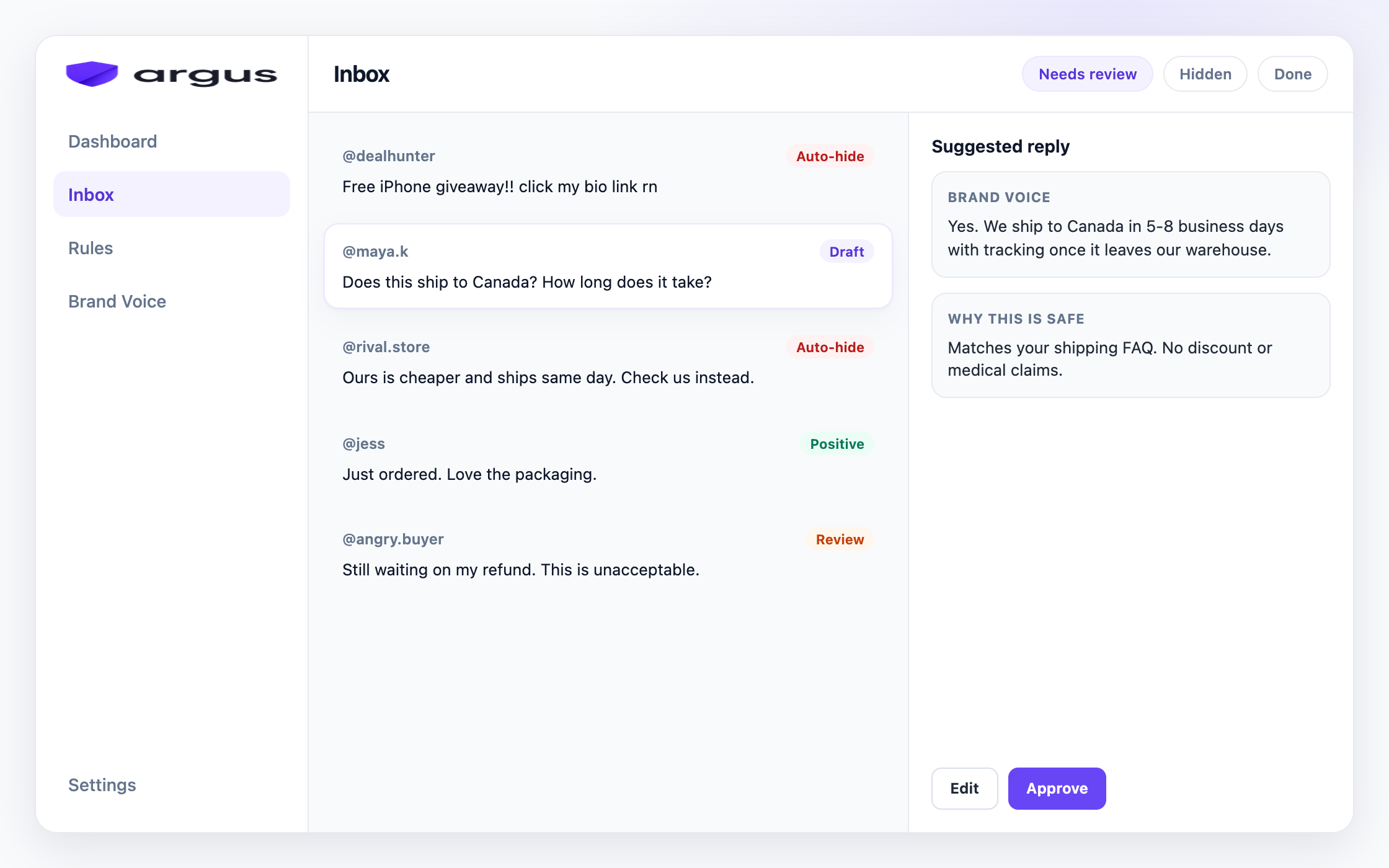
For connected Facebook and Instagram ad threads, Argus classifies incoming comments as spam, scams, toxic content, competitor bait, buyer questions, or complaints. It then applies the action chosen on the Protection board. Clear spam and scam risk can route to Auto-hide. Buyer questions can get grounded drafts. Complaints and unclear cases can stay in Human review.
The daily habit is simple: open Inbox, check Auto-hidden for false positives, and approve drafts waiting in Needs Review. Auto-hidden comments are not deleted, so a wrong hide stays reversible. Draft for review is the default, while Reply & send and Safe Autopilot remain explicit opt-ins.
Argus works on public Facebook and Instagram ad comments. It hides rather than deletes and is not a publishing suite or a DM tool.
FAQ
Open the ad's comments in Meta Ads Manager or your Page inbox, hover the comment, open the menu, and choose Hide. It leaves public view but stays reversible.
Look for behavior across the thread: repeated pitches under unrelated ads, lookalike support accounts, suspicious redirects, or bursts of near-identical comments from rotating profiles. No single profile detail proves a bot. Hide clear spam, report fraud or impersonation, ban repeat Page accounts, and review unclear cases.
The comment leaves public view but remains visible to the person who wrote it and that person's Facebook friends. The author is not notified, and you can unhide the comment later.
Facebook does not notify the author. Because the hidden comment still appears to the author and their friends, most people will not know it was hidden from everyone else.
Prefer hide for almost everything. Hide is reversible and quiet. Save delete for clear policy violations. Argus hides from public view; it does not delete.
They help with exact blocked strings and links. They miss clever wording, misspelled brands, and context, and they do nothing for the buyer questions that needed an answer.
No. Moderation Assist rules apply to organic Page comments. For ad comments, Meta's native automated controls are the Page keyword and profanity filters, alongside manual hiding.
It can if rules are too broad. Route only clear spam to Auto-hide, keep buyer questions in Draft for review or Human review, and check the Auto-hidden view regularly for false positives.
The same logic applies. Instagram has its own native tools (Hidden Words, per-post comment controls), and Argus covers public Facebook and Instagram ad comments in one inbox.
Auto-hide clear spam, draft buyer answers, and keep hard cases in review.