1
Open the ad's comments
In Meta Ads Manager, find the Instagram ad and view its comments so you can work through the thread in one place.

How to hide Instagram ad spam, spot bot comments, use native controls, and keep real buyer questions visible as spend scales.
9 min read · Published Aug 4, 2026
The problem
Spam under Instagram ads has its own texture. Promo bots drop copy-paste chains (“we grew our store with this, DM us”), crypto and investment bait, “DM to claim your prize” scams, and accounts impersonating your support team in the replies. On Reels placements you also see competitor poaching: rival brands and lookalike sellers fishing for your shoppers in your own thread.
Reels makes this worse by design. Reels distribution pushes your ad to people who do not follow you, so a large share of the thread comes from stranger accounts with no relationship to your brand. Some of those strangers are buyers seeing you for the first time. Others are bots and bait accounts that found your ad the same way, and they arrive with every new wave of reach.
One placement note before the methods: Stories ads have no public comment threads, so there is nothing to hide. The comment work on Instagram centers on Feed, Reels, and Explore placements, where threads are public and sit next to the creative while you pay for every impression.
So the job is two-sided: hide the junk fast, and do not hide the buyers. A “does this ship to Canada?” question and a scam link can look identical to a tired reviewer at midnight. Every method below trades speed against accuracy, and the right mix changes with your volume.
Pattern check
No single profile detail proves that a commenter is a bot. Look for repeated behavior across accounts, creatives, and time, then choose the least destructive action that fits the evidence.
Copied promotion pitches across unrelated ads: the same growth story, agency offer, or testimonial-style sentence appears under several creatives and ends with a prompt to DM the account or visit its profile. Hide the comment and restrict repeat accounts.
Fake support and giveaway impersonation: an account borrows your brand name or profile image, claims someone won, then asks for a click, payment, code, or private message. Hide and report it as impersonation or fraud.
Profile-redirect bait with harmless-looking text: the comment sounds friendly, but its only purpose is to move readers to a profile, bio link, or unrelated offer. The payload sits on the account, so a keyword list often misses it.
Repeated wording from rotating accounts: several new or thin profiles post nearly identical lines across different ads. Treat the repetition as the signal, but keep one-off criticism or a genuine product question in review.
The action split is simple: hide clear promotional spam, report phishing and impersonation, restrict accounts that repeat the behavior, and leave unclear comments in review. A skeptical buyer or blunt complaint is not bot evidence.
Method 1
This is the baseline everyone starts with, and at low volume it is genuinely enough. Meta Ads Manager lets you view the comments on your Instagram ads and act on them one by one, and the Instagram app covers the same threads from the other side.
In Meta Ads Manager, find the Instagram ad and view its comments so you can work through the thread in one place.
Next to the comment, open the three-dot menu and choose Hide. The comment leaves public view, and the action stays reversible if you change your mind.
For scams, impersonation, and clear policy violations, report the comment instead of only hiding it. Reporting gives Meta a signal on the account, not just the comment.
In the Instagram app, restrict the accounts that keep returning. Comments from restricted accounts are visible only to them, which quiets the thread without a public confrontation.
Manual hiding is honest work, and for a few comments a day it is the right amount of tooling. It breaks when spend scales: overnight gaps, weekend backlogs, and the same bait account returning under a new name every week. It also means your moderation lives in Ads Manager, while your buyers experience the thread in the Instagram app.
Method 3
The nuclear option is per post: Instagram lets you turn off commenting on a regular post, and ads built from that post inherit the closed thread. There is no universal per-ad comment toggle, so this is a creative-by-creative decision.
Go to the post you plan to run as an ad, or the post the ad is already built from.
Open the three-dot menu on the post and choose Turn off commenting. The comment box closes for everyone.
Ads using that post as creative now run without an open thread. Ads built from other posts are unaffected.
Every creative needs its own decision. There is no way to close comments across a whole campaign in one move.
This genuinely works for a sensitive launch, but it throws away the buyer questions along with the spam, and it does not scale with creative testing. Worth knowing: Meta is testing Comment Controls, a setting that turns comments off for Facebook and Instagram feed ads at the ad-set level, with a limited group of businesses. Most accounts do not have it, and there is no way to request access. For everyone else, per-post controls are the only native off switch.
Reality check
Three methods, all defensible. The frustrations advertisers report are remarkably consistent, and they cluster around the same blind spots.
“Hidden Words hid a real customer.” String matching cannot tell “FREE IPHONE” from a free-shipping question. Keep the list specific, and review what it caught every week. This is the core case for reading a comment's meaning before acting on it.
“The bait has no keywords to block.” Reels bait is often just a friendly sentence and a profile link: “this changed everything for me, check my page”. There is nothing to blocklist, because the payload is the account, not the text. Filters alone will always miss this.
“Turning comments off killed our questions.” Correct, and predictable. No questions, no answers, no fresh social proof under the ad. Most brands do better with a fast, moderated thread than with silence.
“Catalog ads slip through.” Per Meta's developer documentation, comment moderation features do not work with Advantage+ catalog ads. If catalog formats carry most of your spend, treat that as a documented blind spot and confirm exactly which placements any tool in your stack can actually see.
Decision guide
If you get a few comments a day: stay manual, add a small Hidden Words list, and restrict repeat offenders. Spend your attention on the weekly review of what got hidden.
If one account sees steady volume: turn on the general hide control plus a specific custom list, keep manual hiding for the clever stuff, and put the hidden-comments review on a calendar.
If you are scaling spend across creatives: per-post switches and keyword lists will not keep up with Reels distribution and overnight traffic. That is the case for classification-based automation, and it is where a tool earns its cost.
How Argus fits
Every native method asks you to choose between silence and vigilance. The third option is to classify incoming comments by meaning, then apply the action you chose for that category.
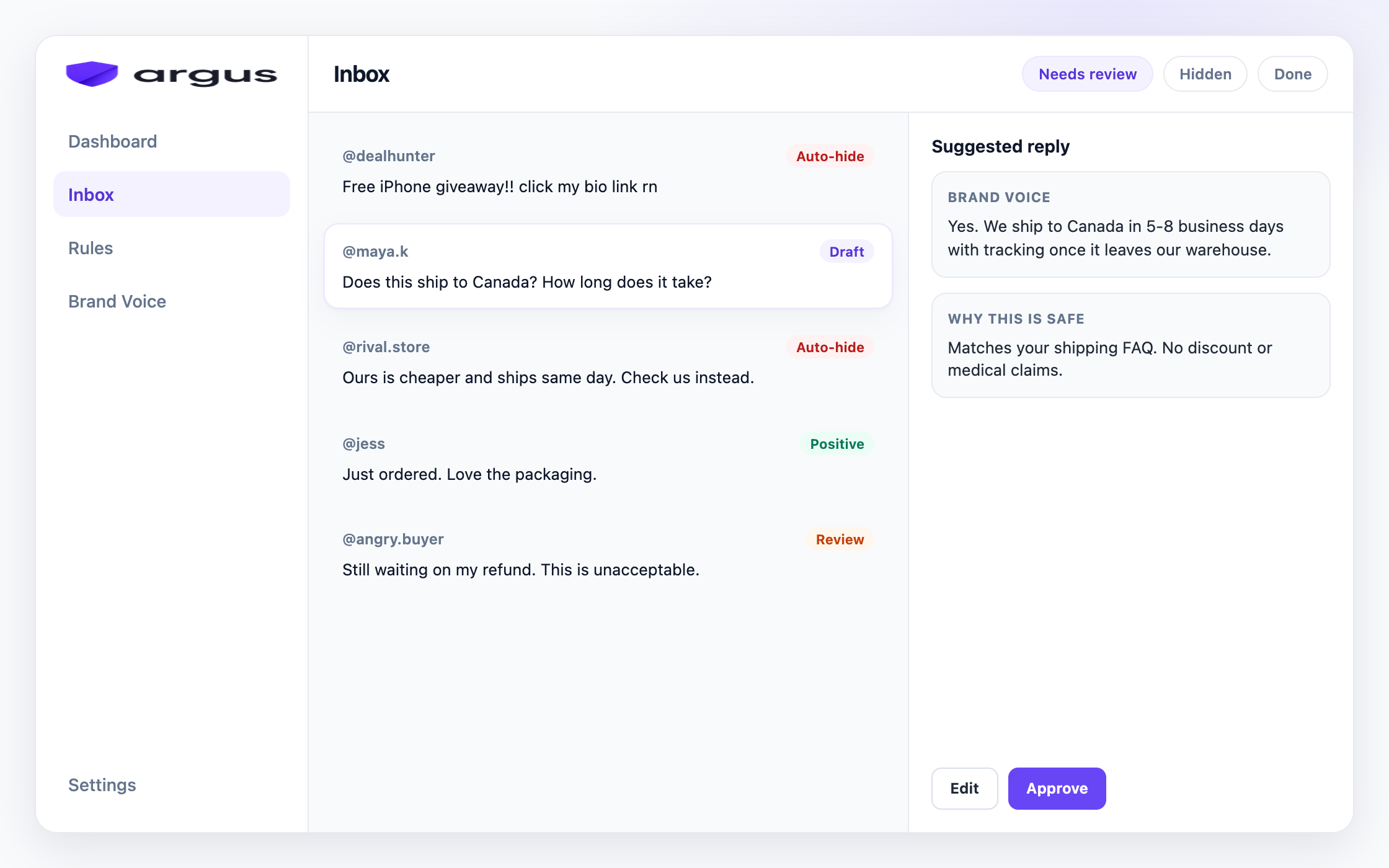
For connected Facebook and Instagram ad threads, Argus classifies incoming comments as spam, scams, toxic content, competitor bait, buyer questions, or complaints. It then applies the action you chose on the Protection board: Auto-hide, Draft for review, Reply & send, Human review, or Do nothing. Clear spam and scam risk can go straight to Auto-hide. Buyer questions get grounded reply drafts written from your Brand Voice knowledge.
The daily habit that replaces the weekend gap: open Inbox, check the Auto-hidden view for false positives, and approve the drafts waiting in Needs Review. Safe Autopilot is a narrow opt-in rather than the default. Auto-hidden comments are not deleted, so a wrong hide is one click to undo.
Argus works on public Facebook and Instagram ad comments. It hides from public view rather than deleting, it does not automate Instagram DMs, and it is not a publishing suite. Start with everything in review, then loosen the rules as you trust the results.
FAQ
Open the ad's comments in Meta Ads Manager, open the three-dot menu next to the comment, and choose Hide. The comment leaves public view and the action stays reversible.
There is no universal per-ad toggle. You can turn off commenting on an Instagram post, which affects ads built from that post, and Meta is testing Comment Controls at the ad-set level with a limited group of businesses.
They are a good baseline: exact blocked phrases plus a general offensive-content control. They miss bait that contains no blockable keywords, they catch real customers on broad words, and they do nothing for the buyer questions that needed an answer.
Hide clear spam, report scams or impersonation, restrict accounts that keep returning, and add specific recurring phrases to Hidden Words. If several ads receive steady volume, use classification so profile bait and reworded spam do not depend on an exact keyword match.
Public Feed, Reels, and Explore ad threads give promotional and scam accounts a visible place to reach shoppers. Common signs include repeated wording across creatives, copied pitches, fake support accounts, and comments designed only to send people to a profile or link.
No. Stories ads have no public comment threads, so there is nothing to hide. Comment moderation on Instagram centers on Feed, Reels, and Explore placements.
Yes. Argus covers public Facebook and Instagram ad comments in one inbox: it classifies each comment, can Auto-hide clear spam and scams, and drafts grounded replies for buyer questions. It hides from public view; it does not delete.
Auto-hide clear spam, draft grounded buyer answers, and keep hard cases in review.