1
Centralize the threads
Use Meta Business Suite so comments from your Instagram ads and Facebook ads collect in one inbox instead of being hunted per placement.

Public replies on your Instagram ads, not DMs. The safe way to automate: grounded drafts, review first, and a narrow auto-send you actually control.
6 min read · Published Aug 4, 2026
The problem
Instagram ads generate the same buyer questions on every creative: shipping, sizing, restock dates, discount codes, “does this work for sensitive skin?”. The questions are predictable, and the people asking them are deciding right now. A fast correct answer converts; silence sends them to the comments of a competitor.
The first confusion to clear: this is about the public comment thread under your ad, not Instagram DMs. DM automation tools answer private messages. They do nothing for the public thread that every future viewer of the ad will read. Both matter; this page is about the public one.
Auto-replying in public is high stakes. A wrong answer is not a private oops; it sits under the creative you are paying to distribute. That is why the safe setups below all share one shape: understanding before speed, and review before posting.
Method 1
The baseline: answer comments yourself, from the Instagram app or the Meta Business Suite inbox. For tone and accuracy it is unbeatable; for coverage it loses to launch days and time zones.
Use Meta Business Suite so comments from your Instagram ads and Facebook ads collect in one inbox instead of being hunted per placement.
Stock, sizing, shipping, and price questions are closest to a purchase. Everything else can wait an hour; these should not.
Public replies are read by hundreds of future viewers. One warm, factual sentence beats a paragraph.
Manual replying works until creative velocity and time zones beat you. The questions do not stop when you launch ten new creatives or when your audience is awake on the other side of the world.
Method 2
The first speed-up: saved replies in Meta Business Suite. Write the answer once, fire it with a shortcut. Perfect for the five questions you get every single day.
Shipping window, sizing, restocks, returns, and your most-asked product question. Keep each one public-reply short.
Use the saved reply as the base and adapt it to the actual question. A verbatim template under a slightly different question reads as a bot.
Promos, shipping windows, and stock change. A saved reply quoting last month's answer is a public error repeated at scale.
Saved replies are fast for exact repeats and blind to everything else. They cannot tell that “restock??” and “when will medium be back?” are the same question.
Method 3
Worth naming because the confusion is so common: DM automation tools (ManyChat-style flows, comment-to-DM triggers). They are good at their job. Their job is not this one.
These tools react to comments by starting a private DM conversation, or they answer DMs directly. The public thread stays exactly as it was.
If your goal is DM funnels and lead capture, that is a real category. If your goal is a clean, answered public thread under your ads, DM tools do not do it.
Brands regularly buy a DM tool expecting ad-comment protection, then discover the public thread is still unmoderated and unanswered.
Argus does not automate Instagram DMs, and this page is not about that category. Public ad comments are a different surface with different rules, and they need their own workflow.
Method 4
The setup that actually fits public Instagram ad comments: grounded auto-reply with review. The AI drafts from your approved knowledge, a human confirms by default, and auto-send is a narrow privilege earned over time.
Link the professional Instagram accounts and Pages that own the paid threads, so every ad comment lands in one place.
Shipping, sizing, restock dates, ingredients, returns: the approved knowledge the AI is allowed to use, and nothing else.
Spam and scam bait get hidden, not answered. Complaints go to Human review. Only answerable buyer questions get drafts.
Approve drafts daily. When the same FAQs prove themselves for weeks, opt into Safe Autopilot for those narrow matches only.
This is the setup where speed and safety stop fighting: answers exist in seconds, a person confirms in minutes, and nothing ungrounded ever appears under your ad.
Reality check
Every team that has tried to automate Instagram replies has a story. They cluster around the same four failures.
“The bot replied to a scam.” A cheerful public answer under phishing bait makes the brand look careless. Classify first: bait gets hidden, never answered.
“It answered a complaint in public, badly.” Complaints need judgment, not templates. Route them to Human review and reply like a person, in the right channel.
“Our DM tool never touched the ad comments.” Exactly right. DM automation and public ad comments are different surfaces. Buying one does not cover the other.
“It invented a product claim.” Ungrounded AI answers from imagination. Grounded systems answer from your approved knowledge or refuse.
Decision guide
If you run a few creatives at a time: manual replies plus saved answers is enough. Spend the saved time on answer quality.
If you launch creatives every week: every new ad restarts the FAQ loop. Grounded drafts with review keep pace without hiring for nights.
If you want full auto-send: earn it. Run draft-only until the same FAQs are right for weeks, then opt into Safe Autopilot for those matches only.
How Argus fits
Safe auto-reply is not about trusting AI. It is about constraining it until trust is earned. That is exactly how Argus is built.
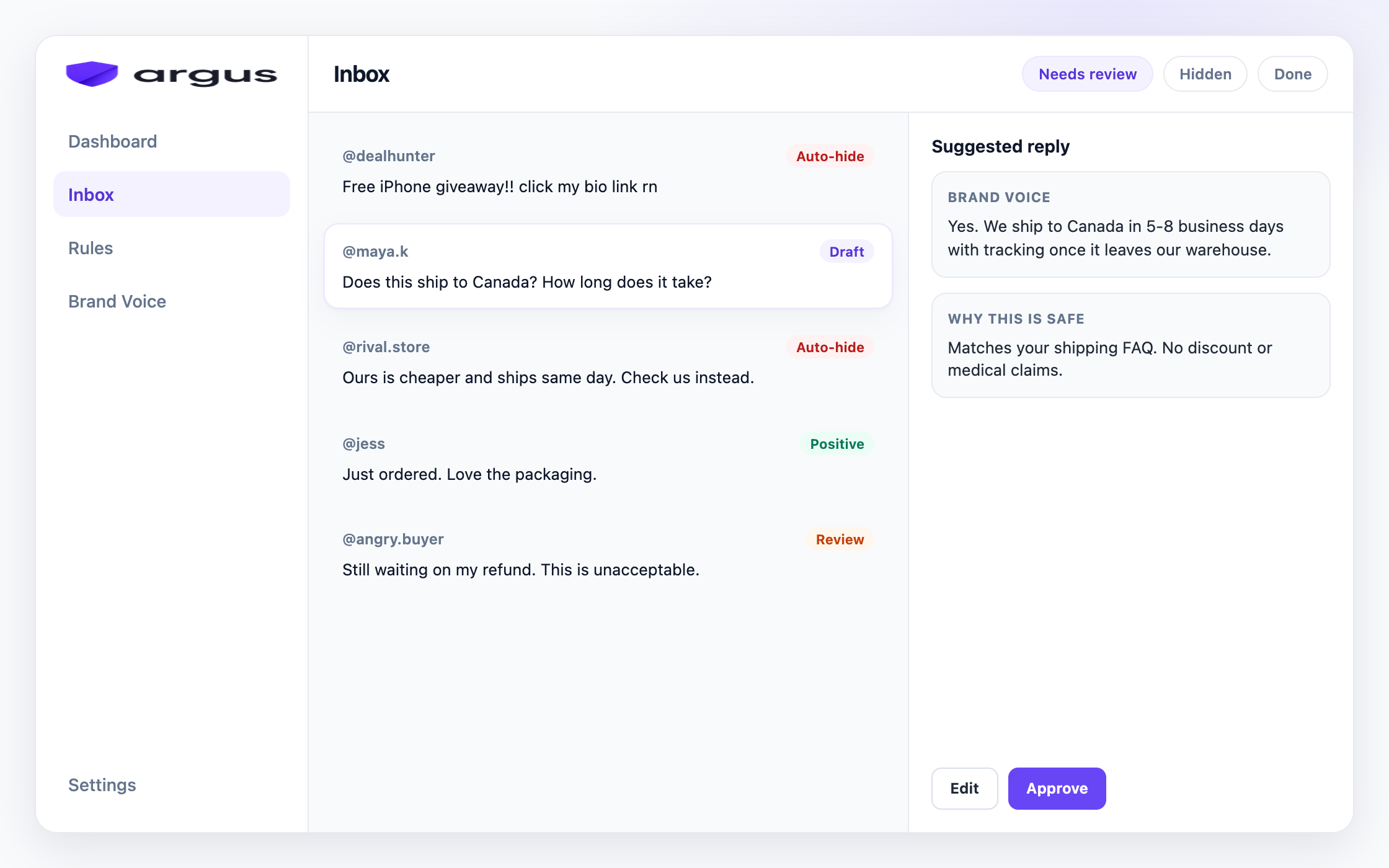
Argus reads every comment under your Instagram and Facebook ads and classifies it before anything replies. Buyer questions get drafts grounded in your Brand Voice knowledge. Spam and scam bait are hidden from public view. Complaints and sensitive topics wait in Human review. Draft for review is the default, and Safe Autopilot auto-sends only on high-confidence FAQ matches you opt into.
The daily habit: open Inbox, approve the drafts in Needs Review, glance at Auto-replied to see what went out. Replies stay public, on-brand, and reversible, and your knowledge base gets sharper every time you edit a draft.
Honest scope note: Argus replies to public ad comments on Instagram and Facebook. It does not automate Instagram DMs, it does not delete comments, and it is not a publishing suite.
FAQ
Yes, for public comments under Instagram ads. Draft for review is the default. Safe Autopilot can auto-send only on high-confidence FAQ matches you opt into.
No. This page and Argus focus on public Instagram ad comments, not Instagram DM automation.
No. Hide clear spam and scams. Send complaints to Human review. Auto-reply only fits answerable buyer FAQs with strong guardrails.
Many tools chase DMs or broad keyword auto-send. Argus classifies the comment first, drafts from Brand Voice, and keeps public hide plus review in the same Meta ad workflow.
Yes. Draft for review is the default workflow. Approve or edit suggested replies in Inbox before they post.
Create an account, set Brand Voice, and connect Meta when you are ready.