1
Work from one inbox
Use Meta Business Suite or your Page inbox so Facebook and Instagram comments collect in one place instead of being chased per ad.

What AI replies can and cannot do under Facebook and Instagram ads, how teams answer today, and the guardrails that make AI safe to use in public.
7 min read · Published Aug 4, 2026
The problem
Buyer questions repeat under every active ad. Shipping times, sizing, stock, ingredients, returns. The person asking is deciding right now, and everyone else reading the thread later judges your brand by whether that question got a fast, correct answer.
So the temptation to let AI answer is obvious. The danger is equally obvious: a public reply is a permanent-feeling record. An AI that invents an ingredient, quotes the wrong return policy, or cheerfully answers a scam comment does its damage in front of your entire warmed audience, under the ad you are still paying for.
The real job is three things at once: fast, correct, and safe. Any two are easy. Fast and correct is a good human on a quiet day. Fast and safe is a template that often answers the wrong question. Getting all three is what the methods below trade off in different ways.
Method 1
The baseline: a person reads each comment and types each reply. For accuracy and tone, nothing beats it. For speed and coverage, it loses to the clock.
Use Meta Business Suite or your Page inbox so Facebook and Instagram comments collect in one place instead of being chased per ad.
Stock, shipping, sizing, and price questions are closest to a purchase. Answer them before anything else.
Public replies are read by future buyers, not just the asker. One clear sentence beats three paragraphs.
Order issues and complaints resolve better in your support channel. Acknowledge publicly in one line, then continue in DM or email.
Manual replying is the right answer at a few comments a day. It fails at scale in predictable ways: overnight questions age badly, weekend backlogs, and reply quality that varies with whoever is holding the phone.
Method 2
The first speed-up: saved replies (canned responses) in Meta Business Suite. You write the answer once and fire it with a shortcut. For exact-repeat questions, it is genuinely useful.
Shipping window, sizing guidance, returns process, restock timing. Keep each one short enough to work as a public reply.
Use the saved reply as a starting point, not the whole answer. A template sent verbatim to a slightly different question reads as a bot.
Policies and promos change. A saved reply quoting last month's shipping window is a small public lie.
Saved replies are fast but deaf. They cannot tell that “does the large fit oversized?” and “is it true to size?” are the same question, or that one of them came from someone who already bought. Humans still do the matching.
Method 3
The aggressive option: keyword-triggered auto-reply bots. A comment matching a rule gets an instant public answer with no human involved. This is where most AI horror stories come from.
Rule-based bots match keywords, not meaning. “This is a scam, I never got my order” and “is this a scam-free checkout?” can trigger the same rule.
The classic failures: a cheerful auto-reply under a scam comment, a promo answer under a complaint, a wrong-policy answer under a return question. All public, all under your ad.
Restrict auto-replies to a tiny set of unambiguous triggers, and keep everything else manual. The wider the trigger, the shorter the time to a screenshot.
Keyword bots are fast, tireless, and unable to understand anything. They made a lot of brands swear off auto-reply entirely, which is fair. The lesson is not that automation is bad; it is that automation without understanding is bad.
Method 4
The newer model, and the one worth understanding: grounded AI drafts. The AI is only allowed to answer from knowledge you approved, and a human reviews before anything posts.
Your real FAQs, product facts, and policies become the AI's entire world. No knowledge, no answer.
Buyer questions get drafts. Spam, scams, and complaints get hidden or routed to a person instead of getting answered.
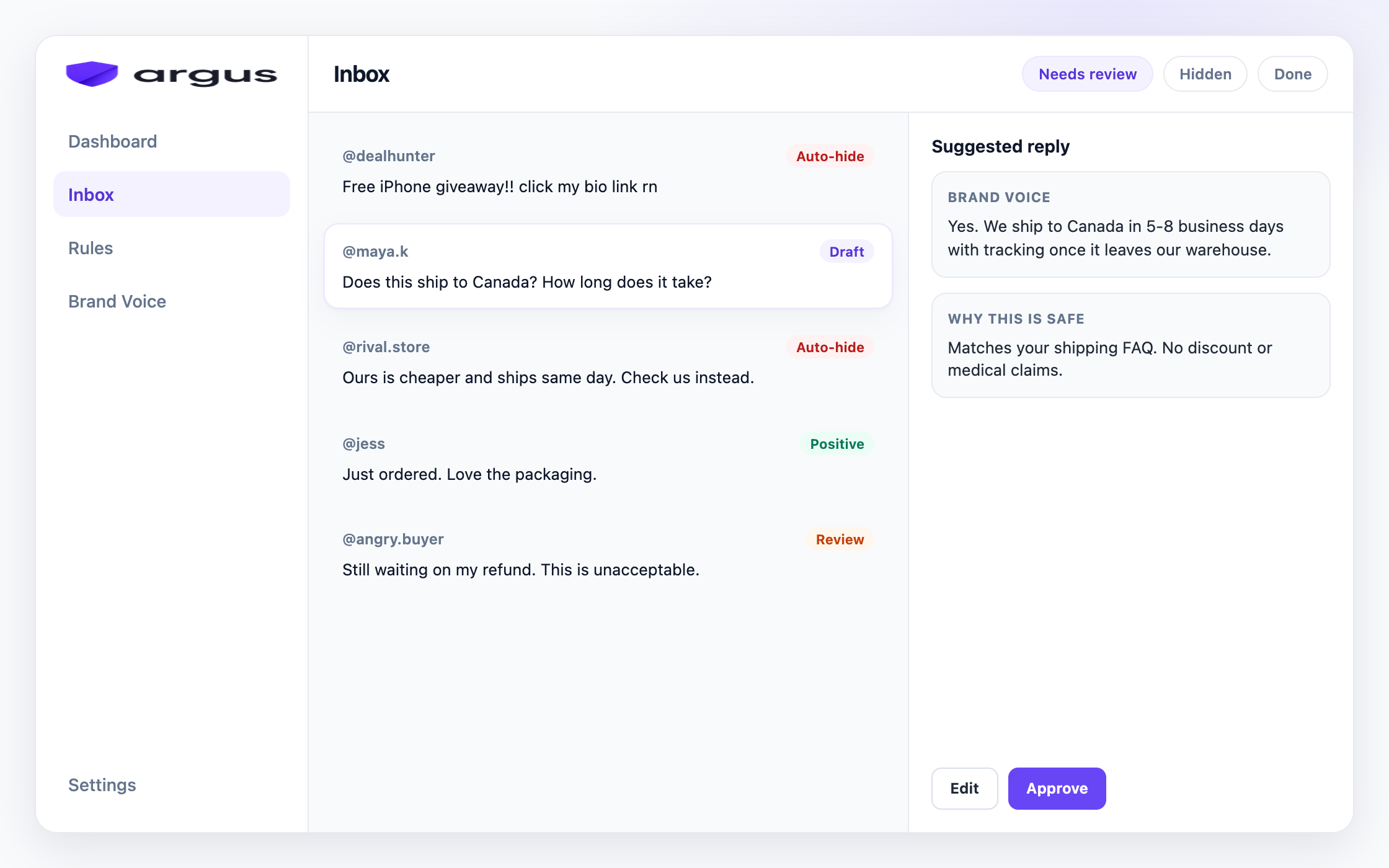
Approve, edit, or reject from a single inbox. The default state of every AI reply is draft, not sent.
When the same FAQ drafts are accepted unchanged for days or weeks, those categories can opt into Safe Autopilot. Complaints, mixed FAQ-plus-complaint comments, and anything the model is unsure about stay in Draft for review or Human review. Audit auto-posted replies weekly, and turn the mode off for a category the moment false posts appear.
Grounded drafting trades a little speed for almost all of the safety: most answers are ready in seconds, a person confirms them in minutes, and nothing ungrounded ever posts. It is the first method where fast, correct, and safe overlap.
If you need a weekly number for the comments that still need a person after drafts, use the free Meta ad comment coverage calculator.
Reality check
Four methods, and the same fears keep coming up whenever teams talk about letting AI near a public thread.
“The AI invented an ingredient we do not use.” That is ungrounded generation: a model answering from general training instead of your knowledge. The fix is architectural. If the answer is not in approved knowledge, the AI must refuse, not guess.
“The bot replied happily to a scam.” Reply automation without classification answers everything, including bait. Classify first: junk gets hidden, not answered.
“The template answered the wrong question.” Saved replies cannot understand variation. They are great for exact repeats and risky for everything else.
“Auto-post sent our old return policy.” Knowledge goes stale. Whatever system you use, someone owns keeping the answers current, and review catches drift before it posts.
Decision guide
It answers only from approved knowledge: your FAQs, facts, and policies are the whole universe. Nothing comes from the model's general imagination.
It refuses what it cannot support: unknown specs, medical-style claims, and sensitive topics escalate to a person instead of getting a confident guess.
It classifies before it replies: buyer questions get drafts; spam, scams, and complaints go to hide or Human review first.
It is reviewed by default: draft-first is not a lack of trust in the AI; it is how the knowledge base gets good enough to trust.
It auto-sends narrowly: only proven, high-confidence FAQ matches, only when you opt in. Widening is a decision, not an accident.
How Argus fits
Everything above points at the same conclusion: AI replies are safe when understanding comes before speed. That is the order Argus is built on.
Argus classifies every comment under your Facebook and Instagram ads first, so replies only happen where a reply makes sense. Buyer questions get drafts written from your Brand Voice knowledge: your approved FAQs, product facts, and policies. If the knowledge cannot support an answer, the draft says so instead of guessing.
Draft for review is the default. You approve or edit in Inbox, and the Auto-replied view shows exactly what went out. Safe Autopilot is the narrow opt-in: it auto-sends only when confidence, FAQ match, and guardrails all pass. Argus does not currently include a business-hours schedule, so leave replies in Draft for review when you need every public answer to wait for your team.
Argus replies to public Facebook and Instagram ad comments. It does not automate Instagram DMs, it is not a publishing suite, and it does not delete comments. Hide-from-public-view keeps every moderation action reversible.
FAQ
Suggested or sent public replies to comments under Facebook and Instagram ads, written by AI from your approved knowledge instead of from a blank prompt.
No. Draft for review should be the default. Auto-send only narrow, high-confidence FAQ matches that you opt into after the drafts prove themselves.
Your Brand Voice: approved FAQs, product facts, and policy answers you load. Drafts come from that knowledge, and the model refuses claims it cannot support.
An opt-in mode that auto-sends only high-confidence FAQ answers grounded in your approved knowledge. Prove those FAQs in Draft for review first. Draft for review stays the default.
Not today. Argus does not yet ship a business-hours schedule. Keep replies in Draft for review if you need every public answer to wait for your team.
Clear spam should be hidden, not answered. Complaints and sensitive topics stay in Human review.
Draft grounded replies for real buyer comments under Meta ads.