1
Connect what owns the threads
Make sure the Facebook Pages and Instagram accounts behind your ads are linked to whatever you use for review, whether that is Business Suite or a moderation tool.

What moderation actually means under an ad, what goes wrong when it is unmanaged, what teams do today, and the operating model that scales.
6 min read · Published Aug 4, 2026
The basics
Facebook ad comment moderation is everything you do about the comments that collect under a paid ad: reading them, deciding which ones hurt or help, hiding the harmful ones from public view, and answering the questions that are close to a purchase. It is not deleting, and it is not silence. Hidden comments leave public view but stay reversible, and good moderation makes the thread more useful, not emptier.
The scope matters. This is about comments on ads, not organic community management. An ad thread is different from a Page post in two ways: the audience is almost entirely strangers with purchase intent, and every hour of neglect costs money, because the ad keeps delivering impressions while the thread sits unattended.
It is also not one job. Under a single active ad you can find promo spam, phishing scams, competitor poaching, genuine complaints, and warm buyer questions, all mixed together. Treating them as one bucket is how brands either leave scams up for days or hide real customers by mistake.
Why it matters
Unlike a search ad, a Facebook ad carries its social proof with it. Prospects see the creative, the copy, and the first few comments in the same unit, and they read those comments as reviews. A thread full of spam and unanswered questions is not a side problem; it is part of what the ad is saying.
The costs come in predictable forms. Spam and scam bait make the brand look careless or unsafe. Competitor poaching redirects buyers at the exact moment of decision. Unanswered buyer questions (shipping, sizing, stock) waste the highest-intent traffic you have. And the common overcorrection, hiding every negative comment, erases the fair criticism that makes a thread believable.
Timing makes all of it worse. Comments arrive around the clock, but most teams check Ads Manager a few times a day. The gap between a scam landing at midnight and someone hiding it at 9 a.m. is seven hours of paid distribution for the scammer.
The landscape
Bot spam and promo bait: copy-paste promos, emoji chains, and “check my page” comments that make the thread look abandoned.
Scam and phishing replies: fake giveaways, lookalike shops, and impersonation accounts that defraud your buyers under your own creative.
Competitor poaching: coupon codes and “buy elsewhere” replies aimed at people one click from purchasing.
Unanswered buyer questions: shipping, sizing, and stock questions that convert when answered and evaporate when ignored.
Over-hiding fair criticism: the trust you lose when real complaints vanish and commenters post the screenshots elsewhere.
Current options
Manual review in Ads Manager: read and hide per comment. Right at low volume; breaks at nights, weekends, and any real spend.
Page keyword and profanity filters: Meta's native automated controls that cover ad comments. They are a useful floor, but they match words and common profanity rather than meaning, so buyers can get caught and clever bait can slip through. Moderation Assist is for organic Page comments, not ads.
Publishing suites with community inboxes: great for scheduling and multi-network replies, but per-category hide and draft rules for Meta ad comments at volume are not their center of gravity.
AI comment tools: the newer specialist category: classify each comment, then hide, draft, or escalate per category. The quality difference between tools is mostly how well they understand meaning and how conservative their defaults are.
Better model
The model that holds up at spend is simple: classify first, then act. Every comment gets read for meaning before anything happens to it. Clear spam, scams, and obvious bait are hidden from public view automatically. Real buyer questions get a grounded reply drafted from your approved knowledge, not silence and not a guessed answer. Complaints, sensitive topics, and anything unclear stay with a human.
Two defaults make the model safe. First, actions are reversible: hide from public view, never delete, so a wrong call is one click to fix. Second, automation is opt-in per category: you decide which comment types act automatically and which always wait for a person. The teams that get burned by automation are usually running broad rules with no classification step in front of them.
Workflow
You do not need a big rollout to start. A conservative first week looks like this, and it works whether you stay on native tools or add a specialist.
Make sure the Facebook Pages and Instagram accounts behind your ads are linked to whatever you use for review, whether that is Business Suite or a moderation tool.
One line per category: clear spam gets hidden, buyer questions get answered, complaints get a person. If a rule does not fit in one line, it is not ready.
Shipping, sizing, stock, returns, ingredients: the five to ten answers your buyers ask for daily, in your voice.
Fifteen minutes: check what got hidden for false positives, answer what needs answering, tighten one rule. Consistency beats intensity.
How Argus fits
If the classify-then-act model sounds right but the daily review sounds like another job, that is exactly the gap Argus fills.
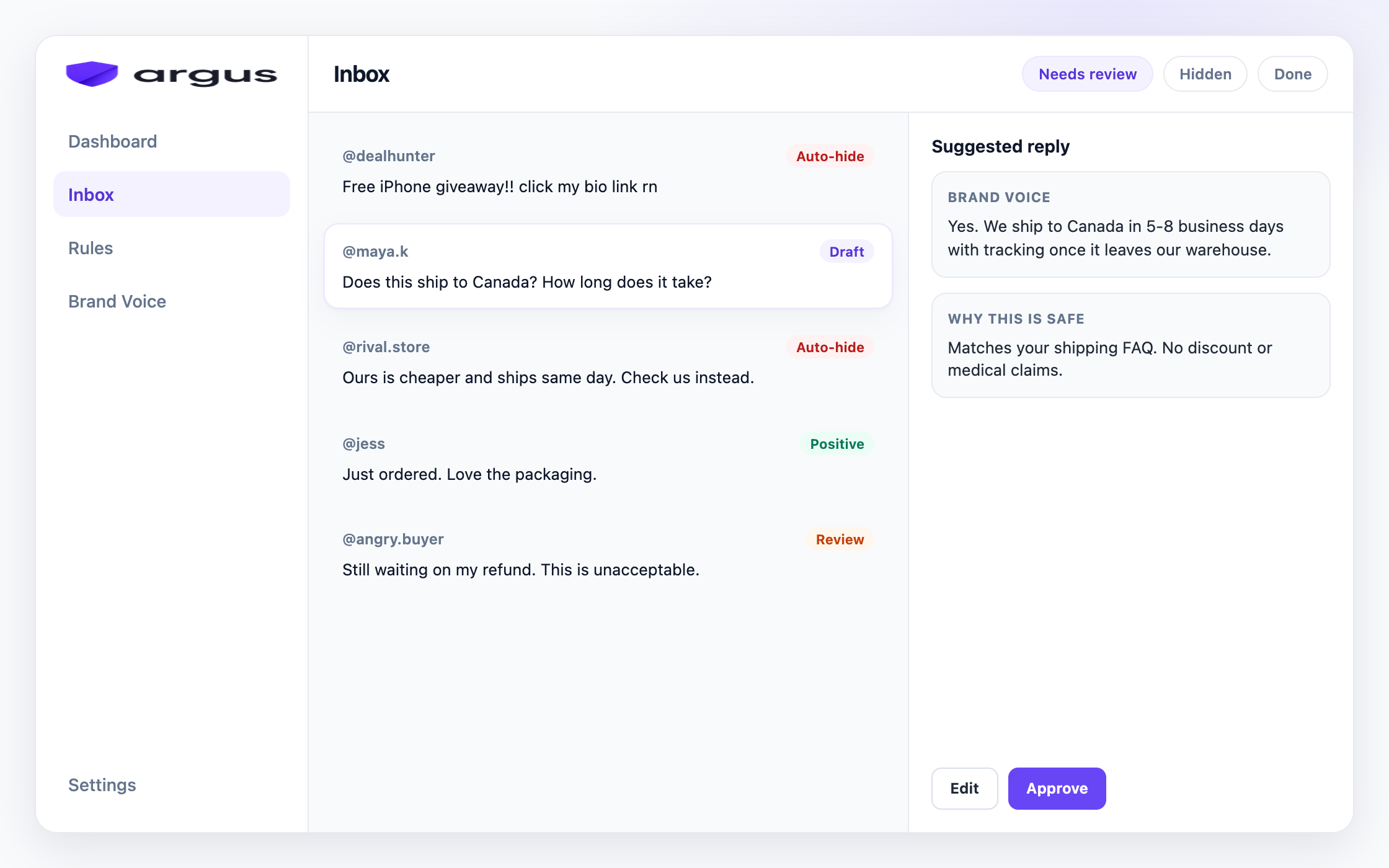
Argus reads every comment under your Facebook and Instagram ads and sorts it into categories like spam, scam, toxic content, competitor bait, buyer questions, and complaints. On the Protection board you choose the action per category: Auto-hide, Draft for review, Reply & send, Human review, or Do nothing. Most teams start with clear junk on Auto-hide and everything else in review, then widen as the rules prove themselves.
Buyer questions get drafts grounded in your Brand Voice knowledge, so answers are fast without being invented. Draft for review is the default, and Safe Autopilot, which sends without approval, stays a narrow opt-in for proven FAQ matches. Every action is a hide from public view, never a delete.
Honest scope note: Argus covers public Facebook and Instagram ad comments. It is not a publishing suite and it does not automate Instagram DMs. It complements the tools you schedule with; it does not replace them.
FAQ
It is the work of reviewing comments under Facebook ads, hiding harmful or low-quality comments from public view, and answering real buyer questions while the ad is still spending.
Spam, scams, competitor bait, and unanswered buyer questions stay visible next to the creative. That can weaken trust for the next people who see the same ad.
Page keyword and profanity filters help with exact blocked strings and common offensive language on ads. Moderation Assist applies to organic Page comments, not ads. Native filters do not understand buyer questions, catch competitor bait that avoids your keywords, or draft grounded replies.
No. Clear spam, scams, and bait can be hidden from the public thread. Fair complaints and unclear cases should stay in Human review so you do not bury real customer issues.
No. Argus complements scheduling and community tools. It focuses on Meta ad comment protection: classify, hide clear junk, draft grounded replies, and keep hard cases in review.
No. Argus hides comments from public view so moderation stays reversible. Delete is not part of the current product.
Yes. Argus is Meta-first for public Facebook and Instagram ad comments. The same Protection board, inbox, and Brand Voice workflows apply to both platforms.
Create an account, set Protection rules, and connect Meta when you are ready.