1
Hide the comment
Hover the scam comment, open the menu, choose Hide. The bait leaves public view but stays visible to the scammer, so they usually do not notice and rarely retaliate.

What scam bait actually looks like, how to kill it natively step by step, and how to keep it from coming back.
6 min read · Published Aug 4, 2026
The problem
Scam bait has patterns, and once you know them you can spot it in a second. Fake giveaways (“You have been selected, DM us to claim”). Lookalike shop links using your own product photos. Brand-impersonation accounts posing as your support team and asking buyers to confirm card details. Crypto and investment bait. And the “claim your prize” reply chains that appear under every new ad within hours of launch.
Scammers target ads because ads deliver a buying-intent audience. Your warmed-up prospects are exactly the people a fake shop or a fake support account can defraud. The scammer is not just renting your impressions; they are harvesting the trust you paid to build.
That is what makes scams different from ordinary spam. Spam makes your thread ugly. Scams actively defraud your buyers, and a customer who gets phished under your ad does not blame the scammer. They blame you.
Two rules govern everything below. First: speed beats everything, because the damage is per-viewer. Second: never debate bait in public. Arguing with a phishing account spreads the bait further and gives it credibility. Hide it, ban it, move on.
Method 1
When you see scam bait under an ad, this is the immediate move. It takes seconds, and done consistently it starves the scam of reach.
Hover the scam comment, open the menu, choose Hide. The bait leaves public view but stays visible to the scammer, so they usually do not notice and rarely retaliate.
From the same menu, ban the account. Hiding treats the comment; banning treats the account, so it cannot keep posting under your ads.
For accounts posing as your brand, report the profile to Meta. Brand impersonation and phishing are what the report flow is actually for.
If a fake giveaway is spreading, add one Page comment stating the official position: real promotions are announced only on your Page, never via DM. One comment, then hide the bait. Do not engage further.
Hide-and-ban works, but it is reactive. You are the detection system, which means every scam lives until you personally see it, and scammers rotate accounts faster than most teams can ban them.
Method 2
The perimeter defense: let the Page keyword filter catch known patterns before a human sees them. Add the phrases, domains, misspellings, and emoji sequences that recur under your ads. Meta hides common variations too. Moderation Assist applies to organic Page comments, not ad comments.
Switch into the Page, open Settings, then Followers and public content. Find the control for hiding comments that contain certain words. Meta supports up to 1,000 entries plus common variations.
Use the exact phrases your scam waves repeat: “you have been selected”, “claim your prize”, known lookalike domains, common brand misspellings, and recurring emoji sequences.
Broad words like free or win will hide real customers asking about promotions. Specific phrases catch scams; broad words catch buyers.
Unhide false positives on a schedule, and add the new phrasings you see. A scam filter is a living list, not a set-and-forget.
Page keyword filters are strong against known domains and repeat phrasing. They are weak against new text-only bait (“message the page for your prize”, no link at all) and lookalike spellings your list has not seen yet.
Method 3
You cannot stop scammers from trying, but you can make the scam harder to profit from. These habits reduce how much bait converts before you even get to hiding it.
Make it easy for buyers to verify: state on your Page and site that you never ask for card details or payments via DM or comment links. Confusion is the scammer's product.
Keep a shared list of impersonator handles, misspellings, and domains before you report them. Repeated text can go into the Page keyword filter, and the record helps every teammate recognize the next wave.
Scam bursts follow new spend. When you launch a big campaign or scale budget, plan same-day comment coverage instead of discovering the bait on day three.
One shared rule: scam on sight means hide plus ban, no debate. Consistency across the team matters more than any single tool.
Prevention shrinks the problem; it never zeros it. Determined bait still gets through, which is why detection speed, not willpower, decides the damage.
Reality check
Hide, filter, prevent: the approach is sound. The frustrations come from how fast scammers adapt to each layer.
“They copy our photos and look official.” Lookalike shops are the hardest bait for buyers to spot. Report them, blocklist the domains and brand misspellings, and post one calm correction comment when confusion is spreading.
“The keyword filter misses new message-me bait.” Right, because the new wording is not on your list yet. “DM the page to claim your prize” is text-only phishing, and catching it reliably requires reading meaning, not matching known strings.
“A customer got scammed and blamed us.” It happens, and it is why speed matters more than perfection. Hide the bait, report the account, help the customer directly, then close the coverage gap that let it sit.
“They come back every time we launch a new ad.” Scam volume tracks your spend. Launches attract fresh bait within hours, so the coverage plan matters most exactly when the team is busiest.
Decision guide
If you see occasional bait: the hide-and-ban ritual plus a specific Page keyword list is enough. Keep the ritual consistent and it stays a small problem.
If phishing waves are regular: maintain a Page keyword list of known phrases and domains, make hide-ban-report a team rule, and plan same-day coverage for launch days.
If spend is always on: text-only bait and lookalike spellings will slip any string filter eventually. That is the case for classification-based detection, and it is where a tool earns its cost.
How Argus fits
Page keyword filters see known strings. Scams live in meaning: the intent to pull your buyer somewhere unsafe, with or without a link attached.
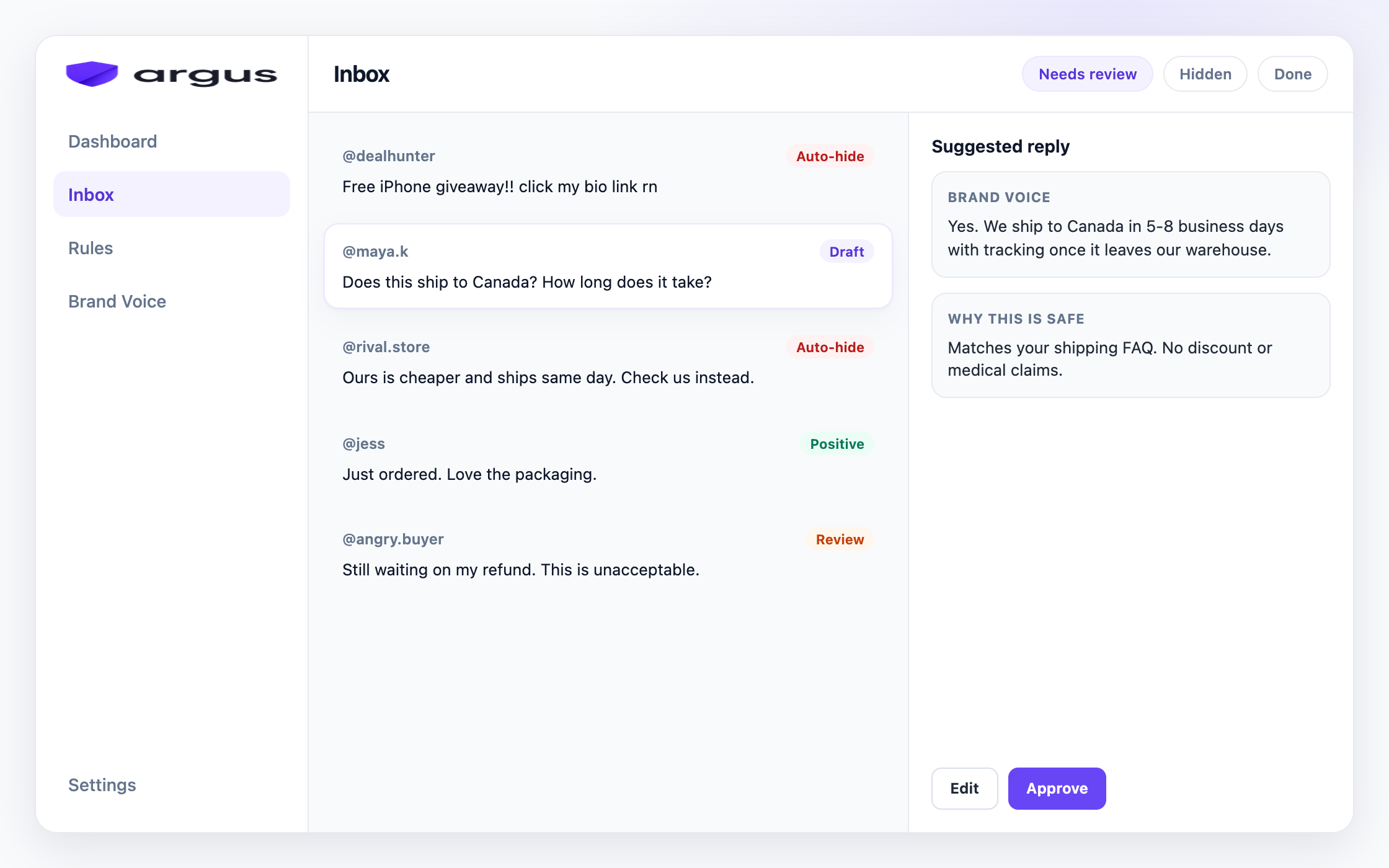
Argus reads that meaning. It classifies every comment under your Facebook and Instagram ads, and scam-risk comments, including text-only “DM to claim” bait, can route straight to Auto-hide when confidence is high. Buyer questions still get grounded reply drafts, and anything unclear waits in Human review instead of being wiped by a blunt rule.
The daily habit that replaces the launch-day scramble: open Inbox, scan Auto-hidden for false positives, clear Needs Review. The rules run through nights, weekends, and launch spikes, and every action is hide-from-public-view, so nothing is irreversible.
Honest scope note: Argus works on public Facebook and Instagram ad comments. It hides rather than deletes, it will not stop a determined scammer from creating new accounts, and it is not a publishing suite or a DM tool.
FAQ
Common patterns: fake giveaways, “DM to claim your prize” bait, lookalike shop links using your product photos, and impersonation accounts posing as your support team.
Hide them. Never debate bait in public; it spreads and legitimizes the scam. If buyers are confused, post one calm correction comment from your Page, then keep hiding.
No. Page keyword filters catch the phrases, domains, and variations already on your list. They miss new text-only bait, unfamiliar misspellings, and accounts that avoid links until a DM. Moderation Assist does not cover ad comments.
Hide the bait, report and ban the account, help the customer directly, then close the coverage gap that let the comment sit. Speed and visible hygiene limit the trust damage.
No. Argus hides comments from public view so moderation stays reversible. Delete is not part of the current product.
Auto-hide clear phishing bait and keep real buyer questions in review.