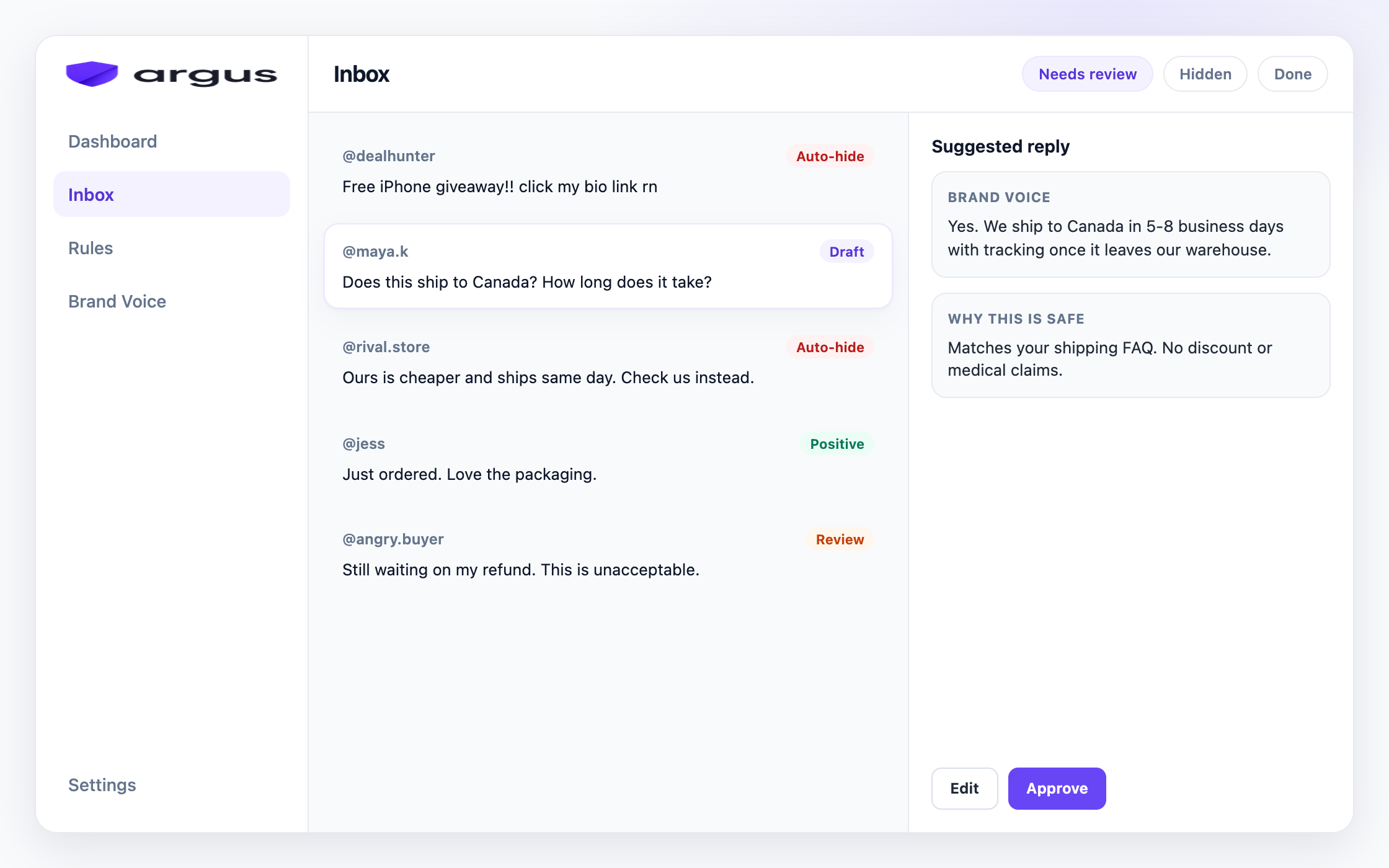
Comment moderation, for an ecommerce brand, is the practice of watching the comments under your Facebook and Instagram ads and posts, removing the ones that cost you sales, and answering the ones that make them. It is not social media management in the broad sense. It is care of the one public surface where your paid traffic forms an opinion before it ever reaches your store.
On Meta it has four moving parts: hide (spam, scams, abuse, bait), reply (buyer questions, positives, complaints), escalate (refund demands, safety issues, anything risky), and learn (which questions repeat, which ads attract junk). Most guides treat moderation as the hiding half. For a store, the reply half is where the money is.
One boundary up front: this is about Meta ad comments, because that is where most ecommerce ad spend lives and where a bad thread costs you the most. The principles travel to other platforms, but every mechanic below is Facebook and Instagram.
The stakes
Why do ecommerce ad threads play by different rules?
Your comments are pre-sale questions. A fashion store's “does this run small?”, a skincare brand's “is this fragrance-free?”, a gadget shop's “does it work with Android?”: these are purchase decisions being made in public. An unanswered question is not a missed notification. It is a paused sale, visible to everyone who comes after.
Your success attracts impersonation scams. Stores that scale get fake-shop scams: “I got mine cheaper at [link]”, counterfeit lookalikes, and phishing pages built from your product photos. Every hour one sits under your ad, it skims buyers you paid to attract.
Your thread is the review section shoppers actually read. Ecommerce buyers distrust polished product pages and read the comments for the truth: shipping times, quality complaints, “is this legit”. A dirty thread quietly taxes every click. A clean, answered one does selling for you.
Your volume spikes with spend, not with your schedule. Scale the budget on Friday and the comments arrive all weekend. Moderation demand follows ad spend, not your team's working hours, and the gap always opens at the worst time.
Competitors shop where you advertise. Rival stores and their affiliates drop “brand X is better” and coupon links exactly where your most expensive traffic is looking. Organic posts get this too, but paid ads concentrate it, because every reader is close to buying.
The product-ad queue
What actually shows up under ecommerce ads?
Product questions need product-level facts. Price, stock, sizing, ingredients, materials, warranty, bundles, compatibility, and “what comes in the box?” all look like simple FAQs until the wrong answer gets posted under a paid ad. Keep the answer tied to the advertised product, collection, and live policy. If the fact is missing or changes often, route it to review instead of guessing.
Marketplace and competitor links need a fast hide rule. Third-party marketplace links, coupon dumps, “same thing cheaper here” claims, lookalike stores, and affiliate bait are not useful comparison shopping under your ad. Hide the clear diversion, record the phrase or domain, and keep the thread focused on the product you paid to promote.
Complaints need a public trust answer first. Late delivery, damaged items, refund frustration, and quality criticism should not disappear by default. Acknowledge the issue in public, move order details to support, and hide only abuse, scams, or coordinated bait. Future shoppers are judging whether the brand handles problems, not whether every comment is positive.
Catalog ads multiply small reply mistakes. A dynamic product campaign can spread comments across many variants at once. A reply that fits one color, bundle, or size can be wrong for another. Moderation works better when comments are reviewed by advertised product and comment type, not only by newest timestamp.
Positive comments are part of the conversion surface. Not every useful comment needs action. Leave real praise visible, answer buying questions once, and avoid cluttering the thread with duplicate brand replies. A clean ecommerce thread should feel alive and credible, not sterilized.
Today’s options
What do ecommerce teams do today, and where does it break?
The default: manual sweeps. Someone checks the Page Inbox and Ads Manager a few times a day, hides the obvious junk, answers what they can. Honest, cheap, and fine at low volume. It fails at nights, weekends, and the week you scale spend.
Native filters: Page keywords and profanity. Page keyword and profanity filters cover paid threads and hide comments containing known strings. Moderation Assist is limited to organic Page comments. The Page filters help with profanity and repeat scam phrases, but they cannot tell “FREE IPHONE CLICK NOW” from “when is the free shipping promo back?”.
Saved replies and template docs. Most teams keep a doc of approved answers to the top questions. It halves reply time and keeps the voice consistent, right up until the doc goes stale and three teammates keep three different versions of it.
Suites and inbox tools. Broad social platforms offer a unified inbox with moderation as one feature among publishing, reporting, and listening. They organize the work, but the ad-comment specifics (buyer-question detection, scam patterns, per-category actions) are usually thin, and you still write every reply yourself.
The better model
What does classify then act look like?
The setup that holds at ecommerce volume flips the order. Instead of a human reading everything and deciding everything, every comment gets classified first: spam, scam, toxic, competitor bait, buyer question, positive, complaint, or sensitive. Then each category gets one standing action.
Clear junk (spam, scams, bait) gets hidden automatically, around the clock. Buyer questions get a drafted answer written from your own product knowledge: shipping policy, sizing chart, returns terms. Complaints and anything sensitive stay with humans, on purpose.
This is the difference between filtering and moderating. Filters match strings. Classification reads meaning, so “is this made from garbage?” does not get treated like “this is garbage”, and a buyer asking about free shipping does not get hidden by the word free.
Putting it together
What weekly workflow actually holds?
Whether you run it manually or with a tool, the weekly shape of a working ecommerce moderation setup looks like this.
1
Audit one week of comments
Scroll or export the last week across your active ads. Count how many comments were junk, how many were real buyer questions, and how many questions sat longer than a few hours. Those three numbers tell you what your setup needs most.
2
Write your action policy
One line per category: spam and scams hide on sight, competitor bait goes to review then hide, buyer questions get answered within the hour, complaints get acknowledged and moved to DM, anything sensitive stays with a named human.
3
Seed your knowledge base
Collect the approved answers to your ten most common questions (shipping, sizing, returns, stock, materials), each with its link. Whether a teammate or an AI drafts tomorrow's reply, this is the source of truth.
4
Turn on native filters for the obvious
Profanity filter plus a short, specific keyword blocklist. Keep it narrow. Broad words hide buyers along with the junk.
5
Review weekly
Check hidden comments for false positives, spot-check answer quality, and add new repeat questions to the knowledge set. Moderation is a system you tune, not a switch you flip.
Run this well and the thread starts working for you: junk disappears fast, buyers get answers while they are still warm, and complaints get handled before they harden. The question stops being whether to moderate and becomes who, or what, does the daily work.
How Argus fits
How does Argus run ecommerce moderation around the clock?
That weekly system is exactly what Argus automates for Meta ads: the classification, the hiding, the drafts, and the review queue.
Argus is that model as a product. It classifies every comment under your Facebook and Instagram ads (spam, scams, toxic content, competitor bait, buyer questions, complaints, and the rest), and your Protection board sets one standing action per category: Auto-hide, Draft for review, Reply & send, Human review, or Do nothing. Junk disappears around the clock instead of waiting for the Monday sweep.
For the money half, buyer questions get grounded reply drafts written from your Brand Voice knowledge, with the sources shown on each draft so you can verify before anything posts. Draft for review is the default. Safe Autopilot is a narrow opt-in for high-confidence FAQ-type questions only, and each auto-post is logged and can be reversed.
Argus covers public comments on Facebook and Instagram ads and posts, and that is the whole scope. It does not pull your Shopify inventory, it does not automate DMs, and it does not replace a publishing suite. It hides comments from public view rather than deleting them. If your week is junk removal at scale plus the same twenty questions on repeat, that is the job it was built for.
FAQ
What else should I know?
What is comment moderation for ecommerce?
The daily practice of cleaning and answering the comments under your store's Facebook and Instagram ads and posts: hiding spam, scams, and bait, answering buyer questions fast, and escalating real complaints. It protects both trust and the paid traffic you are buying.
Do ad comments really affect sales?
They are part of what shoppers evaluate before clicking. A thread full of unanswered questions and scam links reads as a store nobody runs. Fast public answers handle objections for every later viewer, not just the person who asked.
Can't I just use Meta's built-in filters?
Page keyword and profanity filters cover ad comments and catch obvious known strings, but they do not read meaning. A broad list can hide a buyer asking about free shipping and still miss a rephrased scam. Use these filters as a first layer. Moderation Assist is for organic Page comments, not ads.
Should I hide negative comments from real customers?
No. Real complaints get acknowledged publicly and resolved privately. Hiding genuine criticism without answering reads as suppression, and screenshots travel. Hide abuse, scams, and bait, not unhappy customers.
How should ecommerce brands answer stock, sizing, and price questions?
Use approved product facts only: the advertised item, current policy, size chart, shipping window, return terms, and product page. If the fact is missing, changes often, or requires an order lookup, send it to a human instead of letting automation guess.
Does Argus connect to my Shopify store?
No. Argus moderates comments and drafts replies from the knowledge you give it (shipping, sizing, returns, policies), but it does not pull live inventory or order data, and it does not automate DMs.