1
Choose one client and one workspace owner
Start with the account where comment pain is easiest to measure. One signed-in owner runs the workspace and remains responsible for its queue.

Five clients, five threads, five rule sets. A practical agency operating model, plus where Argus fits today as a one-client pilot.
6 min read · Published Aug 6, 2026
The agency math
Moderating comments for one brand is a chore. Moderating them for five or fifteen clients is an operations problem. Each client has their own ads, their own spam patterns, their own voice, their own definition of what should never be hidden, and their own expectation that you are watching around the clock.
The failure mode is never knowledge. Everyone on your team knows how to hide spam and answer a sizing question. The failure mode is multiplication: five clients means five times the logins, five rule sets held in five heads, five weekend gaps, and five clients asking why a specific comment disappeared.
A defensible service needs a separate policy for every client, one named owner for each queue, and numbers the account lead can verify. Without those three things, adding automation only makes an unclear process move faster.
Reality check
The context-switching tax. Log into this client's Business Suite, that client's Ads Manager, a third client's Instagram app. Every switch costs focus, and every client checked less often is a thread going stale. By the third client, nobody is really checking. They are glancing.
One rule set does not fit five brands. Your skincare client wants “doesn't work” accusations reviewed before hiding. Your supplements client wants them gone on sight. Your fashion client's biggest problem is counterfeit links; your gadget client's is scam accusations. A single keyword list across accounts either over-hides one client or under-protects another.
Nights and weekends multiply. One client's launch goes live Friday night; another's scam wave lands Sunday morning. Coverage that sort of works for one brand collapses across a roster, and Monday-you inherits the pile.
The accountability question has no good answer. Sooner or later a client asks: why was this comment hidden? Who replied with that wording? If the honest answer is “someone on the team, probably, we're not sure”, the conversation about your fee gets harder.
New clients onboard slower than they sign. A client signs Wednesday and their campaign launches Friday. If setup means rebuilding rules, lists, and reply docs from scratch, their first weekend runs unprotected.
The model
One policy per client. Keep moderation rules, blocked and allowed terms, brand voice, and product facts separate for every account. A rule tuned for the skincare client should never become the default for the gadget client.
Name one owner for the live queue. Do not share a login across the roster. Give one person responsibility for the client's review queue and keep handoffs in the agency system your team already uses.
Answers come from the client's facts, not your memory. Sizing charts, ingredients, shipping policies, promo terms: each client's approved answers live in their workspace, so whoever (or whatever) drafts the reply starts from the client's source of truth instead of someone's recollection.
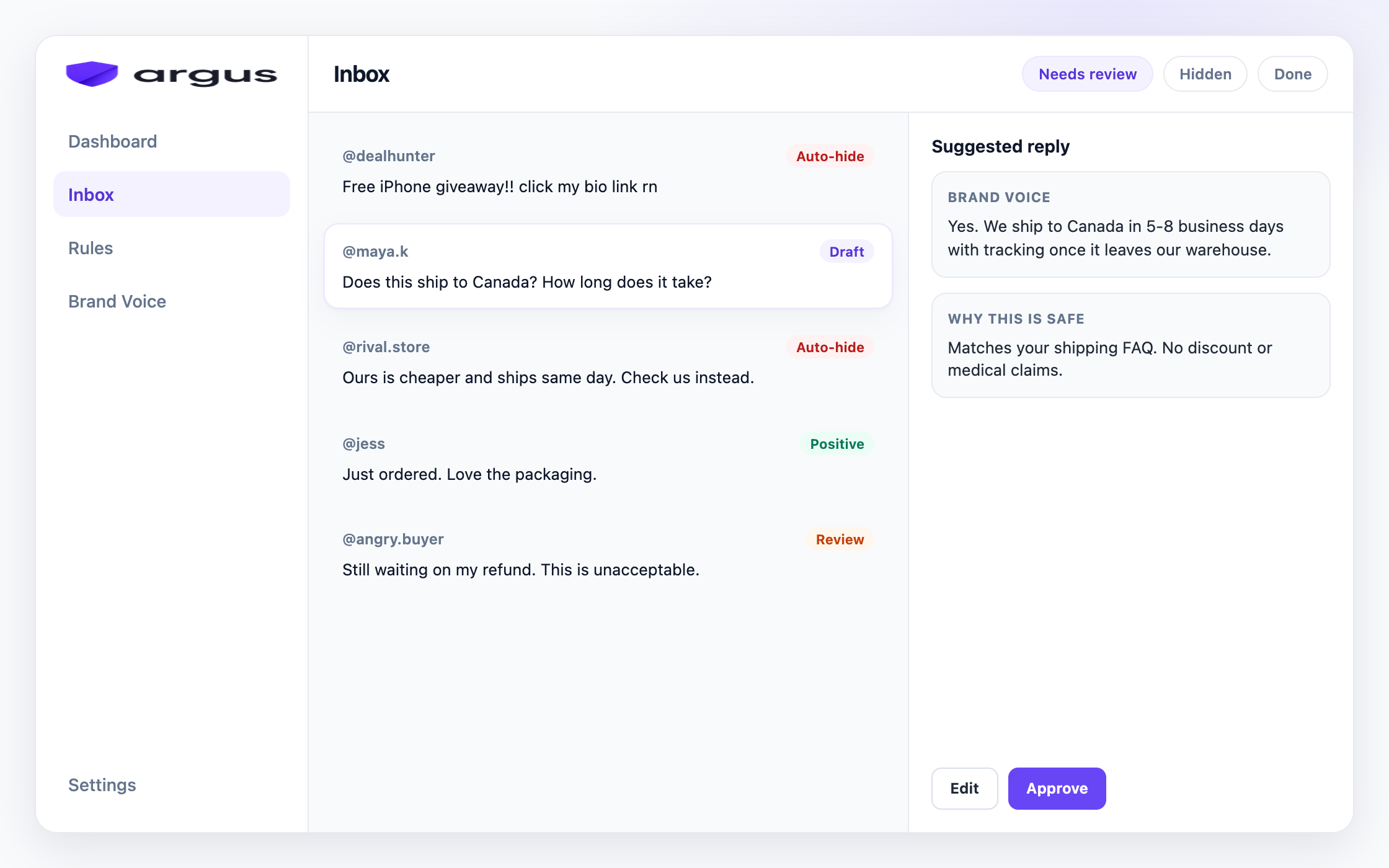
The queue shows what still needs a person. Needs Review, Auto-hidden, and Auto-replied separate open work from actions the system already took. Classification and action context help the owner review a decision without reconstructing the whole thread.
Client reporting uses real workspace counts. Processed comments, hidden comments, replies, risk signals, and estimated time saved are visible in Overview. The account lead can carry those numbers into the client report without inventing a performance claim.
Putting it together
Here is the onboarding-and-running shape that works per client, whether your roster is three brands or thirty.
Start with the account where comment pain is easiest to measure. One signed-in owner runs the workspace and remains responsible for its queue.
Whoever holds the client's Page and Instagram access grants it through Meta's official OAuth flow. No passwords in spreadsheets, no shared logins, and access can be revoked cleanly when the engagement ends.
Per-category actions (what auto-hides, what drafts, what goes to human review), their blocked and allowed terms, competitor list, and the suspicious phrases that matter to their niche. An hour of setup beats a month of drift.
Shipping, sizing, ingredients, returns, promo terms, and tone. Grounded answers only work if the client's facts are in the system before the comments arrive.
Check Auto-hidden for false positives, clear Needs Review, and use Overview totals in the account conversation. Keep assignments and client-ready reporting in the agency tools you already use.
This is the difference between selling “we watch your comments” and running a client policy with a named owner, a visible queue, and results the account lead can verify.
Before you staff a client, estimate weekly comment workload and coverage gaps with the free Meta ad comment coverage calculator.
How Argus fits
Argus fits this model today as a focused single-client workspace beside your agency stack, not as a multi-client console.
The current MVP gives one signed-in owner one workspace and subscription. That workspace has its own Protection board (per-category Auto-hide, Draft for review, Reply & send, Human review, or Do nothing), lists, Brand Voice knowledge, connected Meta accounts, and comment limits.
Buyer questions get grounded reply drafts written from that workspace's knowledge, with Draft for review as the default. Needs Review, Auto-hidden, and Auto-replied show what still needs the owner. Overview shows processed, hidden, replied, risk, and time-saved counts. Team invitations, actor-by-actor audit history, and client-ready monthly reports are not shipped, so keep those jobs in your existing agency system.
Argus covers public comments on Facebook and Instagram ads and posts. It hides from public view rather than deleting, it does not automate DMs, and it is not a publishing suite. Use one client pilot to prove the workflow before deciding how it fits the rest of your roster.
FAQ
The MVP supports one workspace per signed-in owner and one subscription per workspace. Use it for one client pilot. Self-serve monthly pricing is available, with annual options on higher tiers. See the pricing page for current numbers.
Not inside Argus yet. The current MVP has one workspace owner and no team invitation flow. Name one owner for the client, then manage handoffs in your existing agency system.
The Inbox shows the comment's classification and action context, and Auto-hidden keeps system hides available for review. Argus does not yet provide an actor-by-actor audit history or a client-ready report.
Each workspace has its own Brand Voice: tone settings, product knowledge, and words to avoid. Drafts are grounded per client, so the skincare client's replies never sound like the gadget client's.
Public comments on Facebook and Instagram ads and posts. Argus does not cover TikTok, YouTube, or DMs, and it is not a publishing suite. It sits beside whatever you use to schedule and report.
One client policy, grounded replies, and a queue the owner can run.