1
Open the ad set
In Meta Ads Manager, edit the ad set that serves the ads you want to silence, not the individual ad.

The honest answer, four ways advertisers actually handle it, and the complaints that come with each.
9 min read · Published Aug 4, 2026
The honest answer
Here it is plainly: for most advertisers, there is no off switch for comments on Facebook ads. Meta announced Comment Controls at Advertising Week 2024, a setting that turns comments off for Facebook and Instagram feed ads in an ad set, but it is still rolling out to a limited group of businesses. If your account does not have it, there is no request form and no support ticket that unlocks it.
If you are trying to turn comments off on Meta ads, or disable comments on a Facebook ad, you are looking at the same control. It lives in Meta Ads Manager. If Comment Controls are on the ad set, you can set comments to No one for Facebook and Instagram feed ads. If they are not, there is still no universal disable switch.
This is deliberate. Meta treats comments as part of the ad. They are engagement, social proof, and, in Meta's framing, part of what makes feed ads feel native rather than intrusive. So instead of an off switch, Meta gives you moderation tools: manual hiding plus Page keyword and profanity filters.
That reframes the real job. You do not actually want zero comments. You want zero spam, zero scams, and zero competitor bait, while keeping the sizing questions and the “just ordered mine” comments that help the next viewer buy. Below are the four ways advertisers actually get there today, with the real steps and the real complaints for each.
Method 1
If your account is in the test group, this is the cleanest official option. It lives at the ad-set level, not the ad level, and it applies to Facebook and Instagram feed placements.
In Meta Ads Manager, edit the ad set that serves the ads you want to silence, not the individual ad.
Scroll to the Placements section and click See more options.
Look for the Comment Controls setting near the Inventory Filter options. Eligible accounts see two choices: Public (the default) and No one.
Comments stop appearing on feed ads in that ad set. If you do not see the setting, your account is not in the rollout, and there is currently no way to request access.
The catch: this is all-or-nothing. No spam, but also no buyer questions, no answers, and no fresh social proof under the ad. Some advertisers report cost changes when threads go quiet, since comments are part of how people interact with an ad. Treat that as a trade-off to test in your own account, not a rule.
Method 2
The classic workaround predates Comment Controls. It works because organic Page posts have their own comment controls, and an ad can run on top of a post that was never really published.
From your Facebook Page, create the post you plan to run as an ad. Keep it off the Page feed.
Open the three-dot menu on the post, choose who can comment, and select Profiles and Pages you mention. Mention no one, and the comment box effectively disappears.
In Ads Manager, build the ad with Use existing post and select the restricted post. The ad now runs without an open thread.
Every new creative needs its own prepared post. There is no way to apply the setting across a whole campaign in one move.
This genuinely works, and plenty of advertisers still use it. The complaints show up at scale: it adds a step to every creative launch, it is easy to forget once, and it throws away the same buyer questions and social proof as the official toggle. If you test creatives aggressively, the workaround multiplies your setup work.
Method 3
If throwing away the whole thread feels too expensive, Meta's middle path is to keep comments on and auto-hide repeat patterns. The two native automated controls that cover ad comments are the Page keyword list and profanity filter. Moderation Assist is for organic Page comments, not paid threads.
Switch into the Page, open Settings, then Followers and public content. Add the phrases, domains, misspellings, and emoji patterns that recur under your ads. Meta supports up to 1,000 entries plus common variations.
Use the Page profanity setting for common offensive language. Keep it separate from scam detection because polite phishing, fake support accounts, and competitor bait can contain no profanity at all.
Unhide false positives and update the keyword list from patterns that got through. A filter you never audit is a filter that is quietly hiding customers.
Page filters catch strings and common profanity, not meaning. “When is the free shipping promo back?” can trip the same keyword as “FREE IPHONE CLICK NOW”. Scammers also rephrase faster than most teams update their lists. And even when filters work perfectly, they only hide. They do nothing for the good comment that needed an answer.
Method 4
And when no system is set up at all, there is the manual fallback. Open the thread, judge each comment, act. In Ads Manager, open the ad and view its comments, or work from your Page inbox. Hover a comment to hide or delete it.
Prefer hide over delete in almost every case. A hidden comment leaves public view but stays visible to the commenter and their friends, so it rarely escalates, and you can undo a wrong call. Save delete for clear policy violations. Never delete a legitimate complaint without answering it first; screenshots travel.
Manual review is honest work, and at a few comments a day it is fine. The complaints start when spend scales: overnight gaps, weekend backlogs, three teammates with three different standards, and the same scam account returning under a new name every week.
Reality check
Four methods, four different kinds of pain. Whichever one advertisers start with, the same handful of frustrations comes back in communities and support threads.
“I hid the spam, and it came back under a new name.” Hiding treats comments, not accounts. Pair it with banning repeat offenders on the Page, and favor tools that read account signals, not just text.
“My keyword filter hid a real buyer.” String matching cannot tell “FREE IPHONE” from a free-shipping question. This is the core case for classification over keywords: read the comment's meaning before acting on it.
“The scammer does not even know I hid them.” Correct. Hidden comments remain visible to the commenter and their friends. That is usually a feature, since it avoids escalation, but for persistent scam accounts you want hide plus ban.
“I turned comments off and the ad felt dead.” No questions, no answers, no proof. Most brands do better with a fast, moderated thread than with silence.
“Every new ad means doing the workaround again.” Dark-post setup does not scale with creative testing velocity. If you launch ten creatives a week, per-post controls become a second job.
Decision guide
If you have Comment Controls and genuinely want silence: use it. It is the clean official path. Just know you are also closing the buyer channel, not only the spam channel.
If you are running one sensitive campaign: a launch or a polarizing offer that is likely to attract attacks, the dark-post workaround buys quiet for that creative, as long as you accept the setup cost per post.
If your volume is low: manual hiding plus a tight keyword blocklist is enough. Spend your attention on the weekly hidden-comments review instead of new tooling.
If you are scaling spend and testing creatives every week: per-post workarounds and keyword lists will not keep up with you. That is the case for automated moderation, and it is where a tool earns its cost.
How Argus fits
Every method above asks you to pick a poison: silence that kills buyer questions, or vigilance that eats your week. The third option is to make the moderation itself automatic.
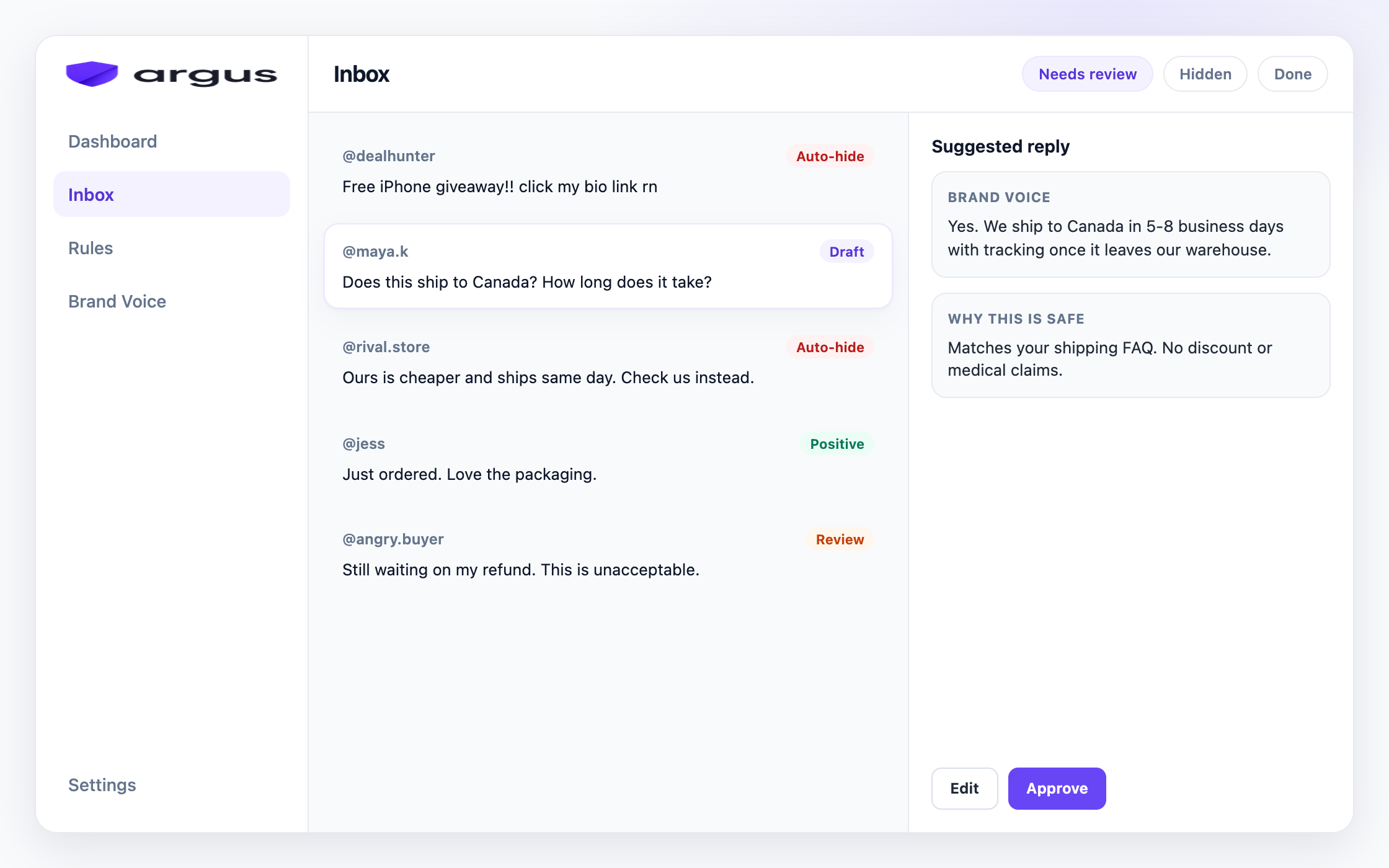
Argus is built for that moderate-don't-silence path. It reads every comment under your Facebook and Instagram ads, sorts it into categories like spam, scam, toxic content, competitor bait, buyer questions, and complaints, then applies the action you chose on the Protection board: Auto-hide, Draft for review, Reply & send, Human review, or Do nothing.
In practice that replaces the worst of every method above. No per-creative dark posts. No keyword lists to maintain, because classification reads meaning, not strings. No overnight gaps, because the rules run while you sleep. And buyer questions get grounded reply drafts from your Brand Voice knowledge instead of silence, with Draft for review as the default and Safe Autopilot as a narrow opt-in.
One honest scope note: Argus works on public Facebook and Instagram ad comments. It hides from public view rather than deleting, it does not automate Instagram DMs, and it is not a publishing suite. If that fits the job you actually have, start with everything in review, then loosen as you trust it.
FAQ
Not for most advertisers. Meta is testing Comment Controls with a limited group of businesses. Everyone else needs a workaround or a moderation workflow.
Meta ads here means Facebook and Instagram ads in Ads Manager, so the answer is the same. If Comment Controls appear on the ad set, set comments to No one for feed ads. If you do not see that setting, you cannot globally turn comments off yet.
Disable comments is the same job as turning them off. Eligible accounts use Comment Controls on the ad set. Everyone else can restrict an unpublished Page post before using it as creative, or keep comments on and hide junk. There is no separate disable switch for a single live Facebook ad.
No. Moderation Assist applies to organic Page comments. For paid threads, Meta's native automated controls are the Page keyword and profanity filters, alongside manual hiding.
It removes spam risk, but it also removes buyer questions and fresh social proof. Some advertisers report higher costs with comments off. Treat it as a trade-off, not a free win.
Create a Page post, restrict commenting to Profiles and Pages you mention, and use that post as your ad creative. The full steps and trade-offs are in method 2 above.
Partially. You can turn off commenting on an Instagram post, which affects ads built from that post, and Meta's limited Comment Controls cover Instagram feed ads for eligible accounts. There is no universal toggle.
Keep comments on and moderate them: hide clear spam and scams automatically, answer real buyer questions quickly, and send edge cases to review.
Auto-hide clear junk, draft grounded buyer replies, and keep hard cases in review.